
A burglar alarm is one of the most misunderstood security investments a property owner can make. Many people think of it as a siren that goes off when someone breaks in. In reality, a well-designed alarm system does far more: and most of its value is delivered before any intrusion occurs.
- A burglar alarm system's primary job is deterrence: discouraging an intruder from targeting the property in the first place. Detection and alerting are the second and third jobs.
- Alarm design matters more than alarm hardware. A correctly designed system with modest equipment will outperform an expensive system that is poorly planned.
- In Singapore, excessive false alarm activations can attract fines from the Singapore Police Force. Correct sensor selection and placement are not just performance issues: they have a direct financial consequence.
- Any form of monitored alarm is better than a bells-only system. Securevision recommends monitoring for all installations: whether through a Central Monitoring Station (CMS) or smartphone self-monitoring.
- For certain industries, CMS monitoring is not a choice: it is a condition of insurance coverage or regulatory compliance.
- In Singapore, alarm installers are required by law to hold a PLRD licence under the Private Security Industry Act: always verify this before engaging any installer.
- Wireless and wired systems can both provide excellent protection. The right choice depends on the property type and stage of renovation, not on which technology is newer.
- An alarm system works best as part of a broader security strategy: not as a standalone solution.
1. What Is a Burglar Alarm System?
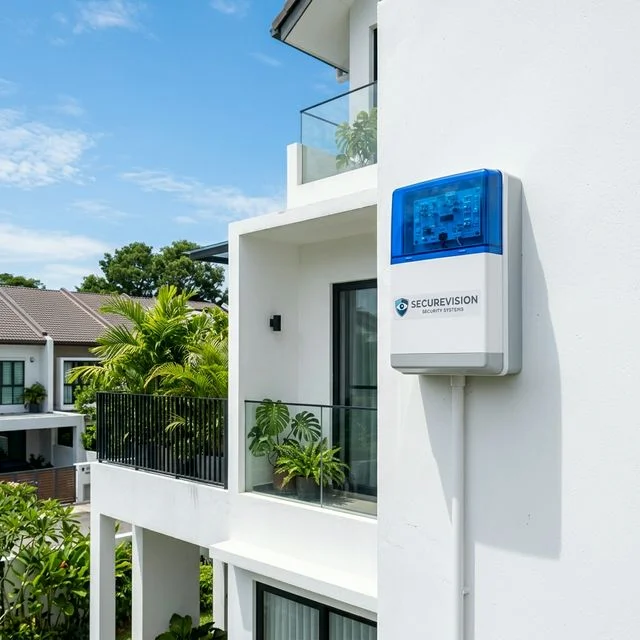
External siren: visible deterrence before any sensor is triggered.
Most people think a burglar alarm is there to catch a burglar. In reality, its primary job is to discourage the burglar from choosing your property in the first place.
A visible alarm system tells an intruder that breaking in is likely to trigger noise, attract attention, and increase the risk of being caught. For most opportunistic criminals: and the majority of residential burglaries in Singapore are opportunistic rather than planned: that calculation alone is enough reason to move on to an easier target. Research on residential burglary consistently shows that most opportunistic intruders make their target selection decision based on visible signals: whether the property appears occupied, whether security measures are visible, and whether the perceived risk outweighs the likely reward.
This matters because it shapes how we think about alarm system design. A system that is visible: external siren box on the façade, warning signage at the entrance, CCTV cameras covering entry points: is doing security work before any sensor is ever triggered. If an intrusion does occur despite the deterrent effect, the alarm system provides a second layer of protection by detecting the event and alerting the right people so that an appropriate response can be initiated.
A modern burglar alarm system is designed around three objectives. Deter: visible alarm equipment, warning signage, and external sirens signal that the property is protected. Detect: sensors identify unauthorised entry or movement within protected areas as early as possible. Alert: the system notifies occupants, property owners, or monitoring personnel so that an appropriate response can be initiated. The effectiveness of an alarm system depends not only on the equipment used but also on how the system is designed and installed. Alarm design is often more important than alarm hardware.
A Note on False Alarms in Singapore
The Singapore Police Force takes a firm position on false alarm activations. Property owners whose alarm systems generate repeated false alarms can be issued fines. Beyond the financial consequence, repeated false alarms erode the credibility of the system: neighbours and responders become desensitised, and genuine alarm events are taken less seriously.
The history of alarm licensing in Singapore is directly connected to this problem. Before the licensing regime was introduced, anyone could install an alarm system regardless of competence or training. The result was a proliferation of poorly installed systems generating chronic false alarms. The introduction of mandatory licensing under the Private Security Industry Act was a direct response. A properly designed and correctly installed system should generate very few false alarms. If your current system regularly triggers false activations, the root cause is almost always a design or installation issue, not a hardware failure. You can read more about how this shaped Singapore's security industry in our article Why Security System Installers Must Be Licensed in Singapore.
2. Core Components of an Alarm System
Although burglar alarm systems come in many forms and at many price points, most systems are built around the same core components. Understanding how these work together makes it easier to evaluate options and have an informed conversation with your installer.
The Control Panel
Control Panel
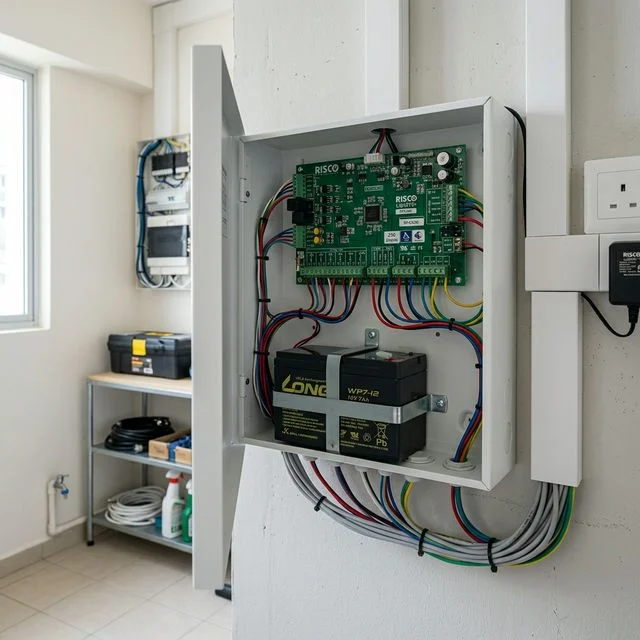
The brain of the system. Every sensor, keypad, and communication device reports back to it. When an alarm condition is detected, the control panel determines what action should be taken: activating the siren, sending a smartphone notification, signalling a monitoring centre, or triggering integrated systems. The control panel also manages the system's zone structure, arm modes, timing logic, and event logging.
Zones
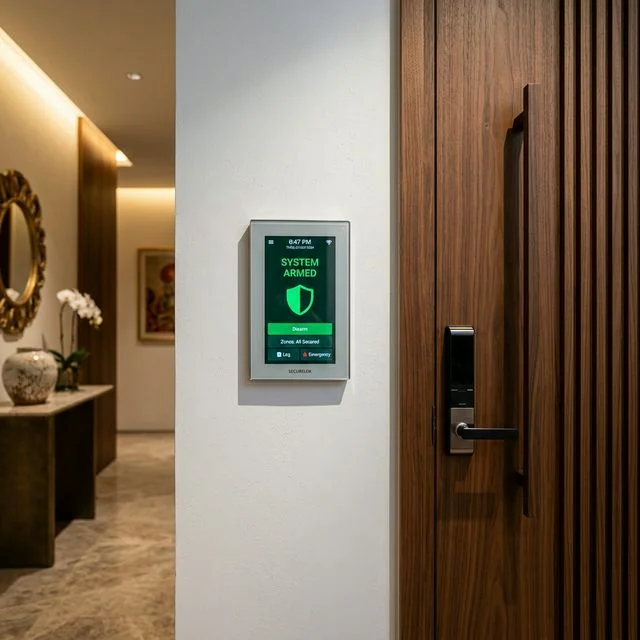
A zone is a logical grouping of sensors within the alarm system. Instead of the entire system being either fully on or fully off, zones allow different parts of the property to be armed and disarmed independently. A family at home in the evening may want perimeter sensors armed while interior sensors remain off. A business may want to arm the server room independently from the main office. Zone planning should be part of the design conversation before any equipment is specified.
Sirens & Strobe Lights
The siren serves two purposes: driving the intruder off the property and attracting the attention of people nearby. Most alarm systems include both an internal siren and an external siren mounted on the exterior where it can be seen and heard from the street. Strobe lights alongside the external siren provide a visual signal, particularly useful in noisy environments where the siren alone may not be immediately noticed.
Tamper Protection
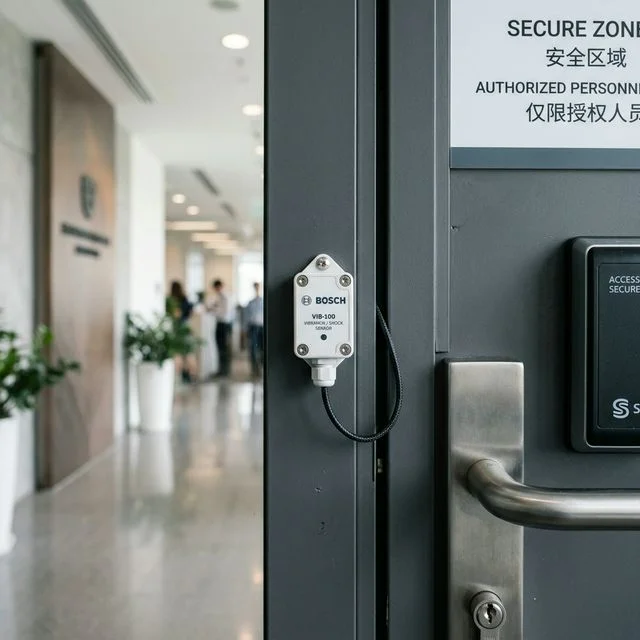
A professionally installed alarm system includes tamper protection on sensors and on the control panel itself. If someone attempts to remove, open, or physically interfere with a sensor or the control panel, the tamper circuit triggers an alert independently of the normal alarm circuit. This makes it significantly more difficult for an intruder to defeat the system by disabling individual components before triggering the main alarm.
Communication Paths
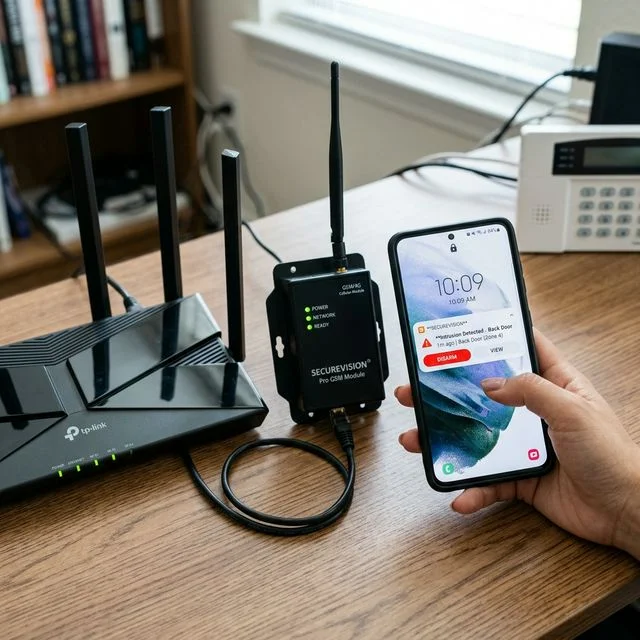
Modern systems communicate through internet (IP) connections, mobile networks (4G/GSM), or both simultaneously. Dual-path communication: using both an internet connection and a mobile network as independent reporting paths: is an important reliability feature. If the internet is cut or fails, the mobile path continues to deliver alerts. For properties connected to a CMS, dual-path also supports alarm panel polling: the process by which the monitoring centre continuously confirms the control panel is online. A panel that stops polling triggers an alert even before an alarm condition occurs. For more on how monitoring evolved in Singapore, see our article How Alarm Monitoring Evolved in Singapore.
Backup Batteries
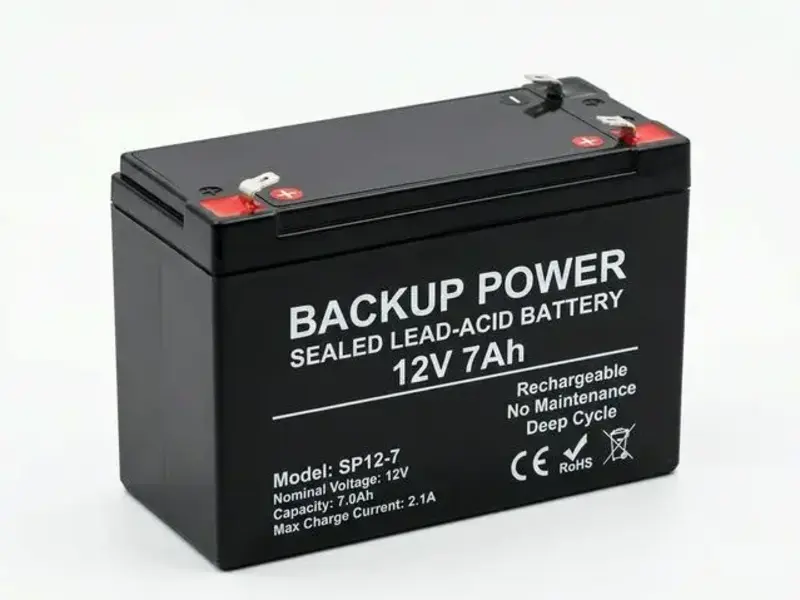
Alarm systems include backup batteries that allow the system to continue operating when mains power is unavailable. The backup battery in the control panel typically provides several hours of operation during a power outage. Wireless sensors are battery-powered independently. Most modern systems provide a low-battery warning well in advance of actual failure: but the warning is only useful if it is acted upon promptly.
3. Wired vs Wireless Alarm Systems
One of the most common questions homeowners ask is whether they should choose a wired or wireless alarm system. Both approaches can provide excellent protection when designed correctly. The right choice depends on the property and the stage of the project: not on which technology is considered newer.
Wired Alarm Systems
In a wired system, sensors are connected back to the control panel using physical cables routed through the building structure. Wired systems offer stable, battery-free sensor communication and are well suited to larger installations where long-term reliability and low maintenance are priorities. They are most practical for new construction or properties undergoing major renovation, where cabling can be installed before wall and ceiling finishes are completed. Retrofitting a wired system into a completed property is significantly more disruptive and expensive.
Wireless Alarm Systems
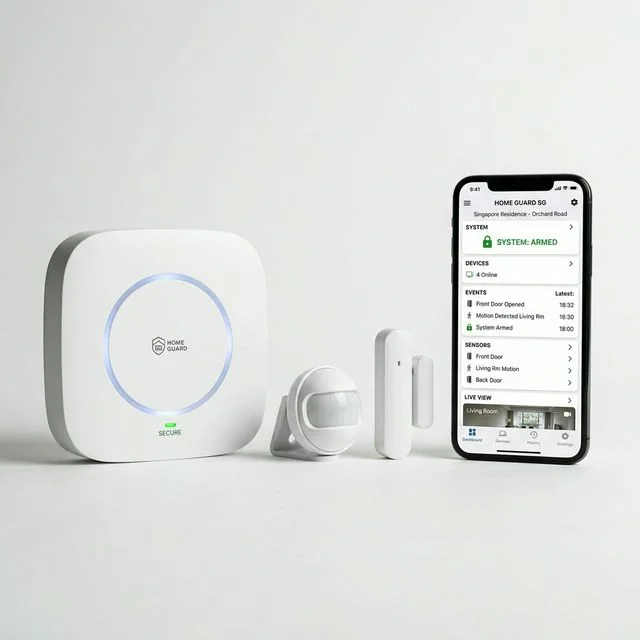
Wireless alarm hub: no cables through completed walls or ceilings.
Wireless alarm systems communicate using encrypted radio signals. Modern wireless technology has improved substantially and wireless systems are now widely used in both residential and commercial installations across Singapore. The primary advantage is installation speed and minimal disruption: no need to run cables through completed walls and ceilings. This makes wireless the practical choice for occupied homes and businesses where disruption must be minimised, and for conservation shophouses and completed interiors where cable routing is not feasible.
The considerations are that sensor batteries require periodic replacement, and in Singapore's high-density built environment: particularly in condominiums and apartment blocks with thick reinforced concrete walls: signal coverage should be assessed during the site survey. Radio frequency interference from neighbouring systems and building infrastructure is a real factor in dense residential developments and should not be assumed away.
Hybrid Systems
Many real-world installations use a hybrid approach: wired sensors where cabling is already in place or can be run during renovation, and wireless sensors where running new cables would be impractical. This is a common and entirely legitimate configuration that gives the best of both approaches for the specific site conditions.
For a new landed home undergoing renovation, a wired system for the main sensor runs is worth considering : cabling can be installed before finishes are completed and the long-term result is clean and low-maintenance. For an occupied property where disruption must be minimised, wireless is usually the more practical solution. Where site conditions are mixed, a hybrid approach is often the right answer. The quality of the design and installation is almost always more important than whether the system is wired or wireless.
4. Sensors and Detection Devices
A burglar alarm is only as good as its ability to detect an intrusion. The purpose of sensors is to identify unauthorised entry as early as possible: ideally before an intruder reaches valuable areas of the property. A well-designed system combines several sensor types to create layered protection rather than relying on any single detection method.
PIR Motion Detectors
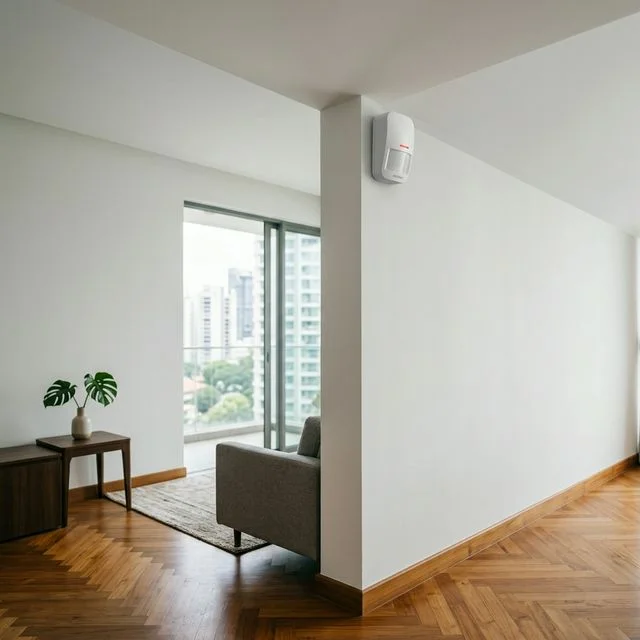
PIR motion detector: senses heat changes caused by a moving person.
PIR stands for Passive Infrared. A PIR detector works by sensing changes in the infrared heat signature within its detection zone: when a person moves through the zone, the change in heat pattern triggers the sensor. PIR detectors do not emit any signal of their own; they passively sense changes in the heat environment, which is why they are described as passive. They are typically installed in living rooms, hallways, stairwells, offices, and reception areas: locations an intruder is likely to pass through rather than every room in the property.
Dual-Technology Detectors
Standard PIR detectors can occasionally be triggered by environmental factors: air-conditioning airflow across a warm surface, direct sunlight through a window, or a pet moving through the detection zone. In environments where false alarm management is a priority, dual-technology detectors offer a more reliable solution. A dual-technology detector combines PIR detection with microwave detection. Both technologies must trigger simultaneously before the detector raises an alarm. This significantly reduces false alarms caused by a single trigger source while maintaining reliable detection of genuine intrusions. For air-conditioned offices, retail environments, and any property where reducing false alarms is a specific concern, dual-technology detectors are the correct specification. You can read more in our article Why Modern Motion Detectors Are Better Than Ever.
Pet-Immune Sensors
Pet-immune PIR sensors use a downward-looking detection pattern calibrated to ignore objects below a certain height: typically animals under approximately 25 kilograms. This allows the sensor to detect a standing adult while disregarding a cat or small dog moving through the same space. The important qualification is that correct mounting height is critical. A pet-immune sensor mounted too low, or aimed at a surface a pet habitually jumps onto, will not perform as designed. If you have pets, discuss this during the system design stage.
Door and Window Contact Sensors
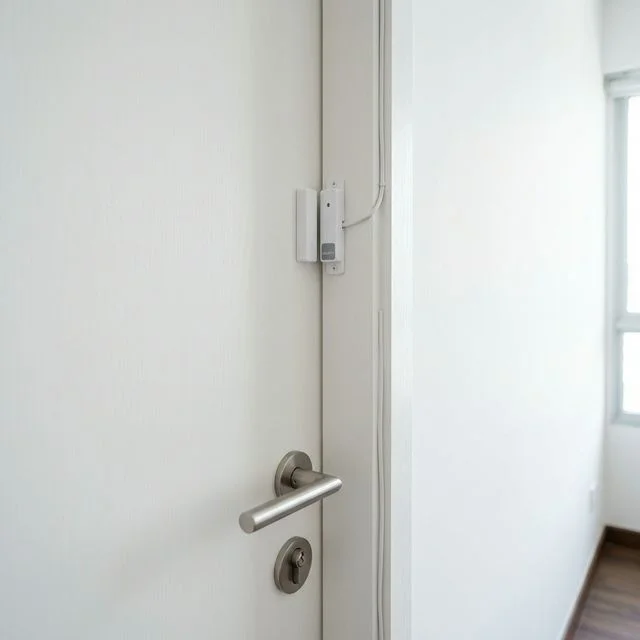
Door contact sensor: triggers the moment a door opens.
Door contacts are among the simplest and most reliable alarm devices. A small magnetic contact is installed on the door frame and a corresponding magnet on the door leaf. When the door is opened while the system is armed, the magnetic circuit breaks and the alarm is triggered. Because the alarm activates the moment the door opens: before an intruder has entered: door contacts provide very early detection. Window contacts operate on the same principle and are particularly important for ground-floor windows, balcony doors, and any window adjacent to an accessible ledge or structure. Many property owners focus protection on doors and overlook windows, which are a common entry route for opportunistic intruders.
Glass Break Detectors
Some intruders attempt to break a window rather than open it. A glass break detector listens for the specific sound frequencies associated with breaking glass and triggers an alarm when it recognises that pattern. These sensors are commonly used in retail shops, showrooms, offices with large glazed panels, and homes with floor-to-ceiling windows. Glass break detectors are typically used as an additional layer of protection alongside contact sensors rather than as a replacement.
Outdoor Detection and Active Infrared Beams
Outdoor sensors detect movement around the property's perimeter before an intruder reaches the building itself. They can protect driveways, gardens, side passages, and perimeter boundaries. Active infrared beam detectors create an invisible detection line between a transmitter and a receiver: when someone crosses that line, the alarm is triggered. Unlike PIR detectors which monitor a zone, beam detectors protect a specific crossing line and are particularly useful for long driveways, perimeter walls, and side passages.
Panic Buttons and Vibration Detectors
A panic button allows a user to manually trigger an alarm during an emergency without waiting for a sensor to detect an intrusion. Common locations include reception counters, cash handling areas, and bedrooms. In commercial environments where staff may face confrontational situations, panic buttons are particularly important: the system response can be configured to trigger a silent alert to a monitoring centre rather than activating the audible siren, avoiding escalating a confrontational situation. Vibration detectors sense physical impact on the surface they are mounted to and are used in commercial applications to protect safes, vaults, and ATM housings.
5. Alarm Design Strategy
One of the most common mistakes property owners make is focusing on equipment before defining the protection objective. The best alarm systems are not necessarily those with the most sensors or the highest-specification hardware. They are the ones properly designed for the specific property and the specific risks it faces.
In our experience, design decisions have more impact on long-term alarm performance than the choice of hardware brand. A correctly designed system with mid-range equipment will almost always outperform an expensive system that has been poorly planned or poorly installed.
We regularly assess systems installed by others where sensors have been placed for convenience of installation rather than effectiveness of detection. A motion sensor in the corner of a room facing a blank wall is not protecting anything. The placement decision matters as much as the sensor specification.
Layered Protection
A well-designed alarm system creates multiple layers of detection. No single sensor type is relied upon exclusively. If one layer fails to detect an intrusion, the next layer catches it.
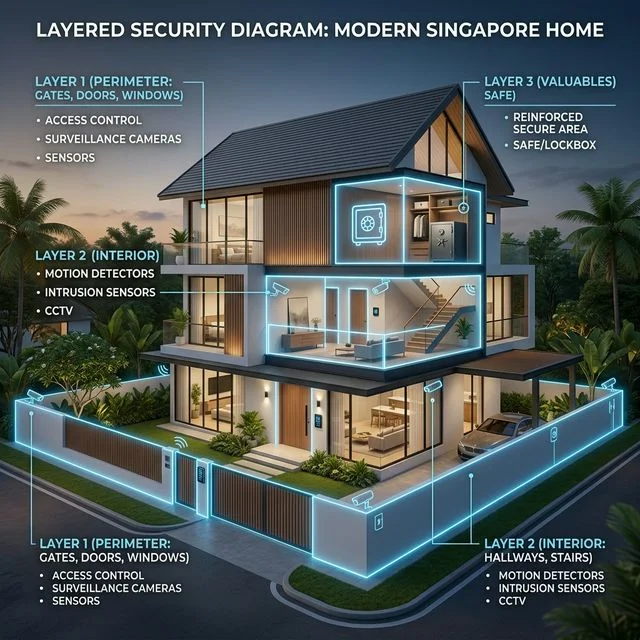
Layer 1: Perimeter detection. Sensors that detect movement or intrusion around the outside of the property before entry is attempted. Examples include outdoor PIR sensors, active infrared beams, and gate sensors.
Layer 2: Entry detection. Sensors that detect the moment a door or window is opened. Examples include door contacts, window contacts, and glass break detectors.
Layer 3: Interior detection. Sensors that detect movement inside the property after entry has occurred. Examples include PIR detectors and dual-technology detectors.
A system designed with all three layers provides multiple opportunities to detect an intrusion and multiple points at which the alarm can respond.
Arm Modes: Full Arm and Stay Arm
Most alarm control panels support at least two arming modes. Full arm: sometimes called away arm: activates all sensors across all zones. This is the mode used when the property is entirely unoccupied. Stay arm: sometimes called home arm: activates perimeter and entry sensors while leaving interior motion sensors inactive. This is the mode used when occupants are present: a family sleeping overnight would typically use stay arm, with doors and windows protected but free movement inside the home. Understanding arm modes before installation allows the system to be zoned and configured correctly for the way the property will actually be used.
Entry and Exit Delays
Entry delay is the time allowed between opening the entry door and disarming the system before the alarm sounds: giving the authorised user time to reach the keypad or disarm via the smartphone application. Exit delay is the time allowed between arming the system and the system becoming fully active, giving the user time to leave after arming. We configure both delays to the minimum practical duration: long enough for comfortable normal use, short enough that an intruder cannot exploit the window. A common mistake is setting delays too generously, which undermines the perimeter protection.
What Should Be Protected First?
If budget is a constraint, prioritise in this order: main entry points, ground-floor access points, areas containing valuables or sensitive equipment, and common circulation routes that an intruder must pass through. The objective is not to cover every square metre of the property. The objective is to create a detection net that an intruder cannot move through without triggering an alarm.
6. Monitoring: Bells Only, Self-Monitoring, or CMS
Detecting an intrusion is only the first step. The equally important question is: who gets notified, and what happens next? Securevision's position is straightforward: any form of monitored alarm is better than a bells-only system. We recommend monitoring for every installation. The appropriate tier depends on the property, its risk level, and how it is occupied.
Tier 1: Bells Only
When the alarm activates, the internal and external sirens sound and strobe lights flash. Nobody is automatically notified. The system relies entirely on noise attracting the attention of neighbours, passers-by, or occupants already on the premises. A bells-only alarm is effective as a deterrent and can drive an intruder off the property once triggered. However, if the property is unoccupied and neighbours do not respond, a bells-only activation may go entirely unresponded to. For properties regularly left unoccupied, bells-only is not a sufficient monitoring strategy.
Under Singapore regulations, alarm sirens are not permitted to sound indefinitely. We programme our systems to cut off within eight minutes: and in most cases considerably less. The siren stopping does not mean the system has stopped monitoring. The control panel continues to record events, send notifications and respond to further activations.
Tier 2: Self-Monitoring via Smartphone

Smartphone alarm notification: direct alert to the property owner.
When the alarm activates, a push notification is sent immediately to the property owner's smartphone. The owner can view the alert, check the CCTV feed if cameras are integrated, and decide what action to take. Advantages: low or no ongoing cost; immediate direct notification to the person who knows the property best; full control over the response decision. Disadvantages: relies entirely on the owner being reachable and in a position to respond; notifications can be missed if the phone is on silent or the battery is flat; no structured backup if the owner cannot be reached. For properties frequently unoccupied or owners who travel regularly, self-monitoring alone has meaningful gaps in coverage.
Tier 3: CMS Monitoring
With CMS monitoring, the alarm signal is routed to a professional monitoring centre staffed around the clock. When an alarm is received, trained operators follow a pre-agreed response procedure: typically attempting to contact the designated keyholder, escalating to secondary contacts if there is no response, and coordinating an appropriate response if the situation warrants it. Advantages: continuous coverage regardless of what the owner is doing; structured response procedures that do not depend on a single person being reachable. Disadvantages: ongoing monthly monitoring fee; response time depends on the operator's procedures and available resources.
For properties connected to a CMS, the monitoring centre also monitors the health of the connection itself through alarm panel polling: the control panel regularly signals the centre to confirm it is online. If the panel stops polling, the monitoring centre receives an alert even before any sensor is triggered. This is a meaningful additional layer of protection that self-monitoring cannot replicate.
We regularly encounter property owners who believed professional monitoring meant an immediate police or security response to their property. The discovery that this is not the case: often made during or after an actual incident: is a source of significant frustration. Setting the right expectation before installation is part of our job.
An Honest Note on Police Response in Singapore
The Singapore Police Force does not dispatch officers in response to unverified alarm activations. Professional monitoring in Singapore means a trained operator follows a response procedure and attempts to reach keyholders: it does not guarantee an immediate police or security guard response to the property. The primary value of CMS monitoring is ensuring that a structured, human-staffed process is always initiated when an alarm activates, regardless of whether the property owner is reachable.
When CMS Monitoring Is a Requirement, Not a Choice
For certain industries and property types, CMS monitoring is not an optional upgrade: it is a condition of insurance coverage or a regulatory requirement. Jewellers, goldsmiths, and businesses handling high-value items typically find that their insurers require a monitored alarm system as a condition of coverage. Pharmacies and facilities storing controlled drugs may face monitoring requirements under licensing conditions. High-value warehouses and logistics operators often find that cargo insurance policies specify a monitored alarm system. Cash handling businesses and financial institutions typically face monitoring requirements as part of their compliance framework. Data centres and server rooms handling sensitive data may face monitoring requirements under their compliance or insurance frameworks.
Before deciding on a monitoring tier, check with your insurer whether your policy specifies a monitored alarm as a condition of coverage. If it does, self-monitoring via smartphone is not sufficient regardless of personal preference. Securevision can advise on systems and CMS partners that meet typical insurance and compliance specifications.
We do not operate a CMS ourselves. We work with established monitoring partners in Singapore and can recommend and integrate with them based on the property type and requirements. A bells-only alarm is better than no alarm. A monitored alarm is better than bells-only. The right tier depends on the property, its risk profile, and how it is occupied.
7. Smartphone Integration and CCTV
Modern alarm systems are no longer limited to keypads and sirens. Most current platforms support smartphone applications that allow users to manage the system remotely and integrate with other security systems on the same property. We recommend integrating CCTV with the alarm system on almost every installation where budget allows: not because CCTV replaces the alarm, but because it answers the question the alarm cannot answer on its own. The alarm tells you something has happened. The CCTV tells you what. Common application features include arming and disarming remotely, receiving real-time alarm notifications, viewing sensor status and zone information, checking event history and logs, and managing user access credentials.
Integration with CCTV
Alarm and CCTV integration: verify events visually within seconds.
The combination of a burglar alarm and a CCTV system is significantly more powerful than either operating independently. When an alarm activates and a notification is sent to the homeowner's smartphone, the owner can immediately open the CCTV application and review live or recorded footage from the area that triggered the alarm. This allows the event to be verified within seconds: distinguishing a genuine intrusion from a false alarm without needing to travel to the property. For monitoring centres, CCTV integration enables alarm verification before a response is dispatched. An operator who can visually confirm an intrusion is in progress can initiate a faster and more targeted response than one acting on an alarm signal alone.
Integration with Smart Systems
Some alarm platforms can integrate with smart lighting, smart locks, and building automation systems, allowing additional automated responses during alarm events: for example, activating all lights when the alarm triggers, or locking specific internal doors when a perimeter breach is detected. The practical value of these integrations depends on the property and the platform, and should be evaluated based on genuine operational benefit rather than technical novelty.
8. Property Type Guide
Different properties have different security profiles, different risk exposures, and different operational requirements. The following reflects the approach we take for each property type based on more than 37 years of alarm installations across Singapore.
Singapore Landed Home

Typical Singapore landed home alarm setup.
The typical security concern for a Singapore landed home is opportunistic intrusion: an intruder testing entry points while the property appears unoccupied. Protection typically focuses on the main entrance and rear entrance with door contacts, ground-floor windows and balcony access points with window contacts, staircase landings and living areas with PIR detectors, and outdoor perimeter detection on larger properties with accessible side passages or gardens. Stay arm mode is important for families at home in the evenings or overnight: perimeter sensors remain active while interior sensors are disabled, allowing free movement inside. Smartphone monitoring is typically sufficient for most landed home applications. CMS monitoring is worth considering for properties frequently left unoccupied for extended periods.
HDB Flat
A significant proportion of Singapore residents live in HDB flats, and the alarm design considerations are meaningfully different from a landed property. The building perimeter and common areas are managed by HDB and the town council. An individual flat's alarm system focuses on the unit's own entry points only - primarily the main door, and any windows accessible from a common corridor, ledge, or neighbouring structure. In most HDB flats, the main door is the only realistic entry point, which simplifies the sensor requirement considerably. Wireless systems are the practical standard for HDB installations: running new cables through a completed HDB flat is disruptive and rarely necessary. External sirens mounted on the common corridor or exterior façade may require HDB approval and are subject to restrictions on common areas.
Condominium Unit
A condominium unit has a different risk profile from a landed home. The building perimeter is managed by the condominium's own security infrastructure: guards, CCTV, and access control. The alarm system for an individual unit therefore focuses on the unit's own entry points: the main door, any secondary access doors, and windows accessible from common corridors or adjacent structures. Door contacts on the main door, window contacts on accessible windows, and a PIR detector covering the living area typically provide adequate protection for most condominium units. It is worth noting that the MCST's security systems - however comprehensive: protect the estate's common areas and perimeter. They do not extend into individual units. A door contact on your own main door remains the correct first line of protection for the unit itself, regardless of what security infrastructure the condominium operates.
Retail Shop or F&B Outlet
Retail environments face a different risk profile: the primary concern is after-hours intrusion targeting stock, cash, or equipment. Protection typically includes entry detection on all access doors, glass break detectors on display windows, PIR or dual-technology detectors covering the sales floor and storage area, and a panic button at the service counter for use during operating hours. CMS monitoring is strongly recommended for retail environments, particularly those handling cash or high-value stock. For many retail insurance policies, a monitored alarm is a condition of coverage: confirm this with your insurer before deciding on a monitoring tier.
Office
Office environments typically focus protection on entry points, server rooms, and areas containing sensitive equipment or documents. PIR or dual-technology detectors covering general office areas, door contacts on server room and store room access, and panic buttons at reception counters are the typical configuration. Air-conditioned open-plan offices benefit from dual-technology detectors to reduce false alarms caused by airflow across warm surfaces.
Warehouse or Industrial Facility
Larger sites require a more comprehensive approach: perimeter protection using active infrared beams or outdoor PIR sensors, interior protection using PIR detectors covering key areas and circulation routes, door and window contacts on all access points, and integration with CCTV for alarm verification. CMS monitoring is strongly recommended and is frequently a requirement of the insurance policy covering stored goods. For high-value warehouses, discuss the specific monitoring requirements with your insurer before finalising the system specification.
| Property Type | Typical Sensor Configuration | Monitoring Recommendation |
|---|---|---|
| Landed home | Door contacts, window contacts, PIR detectors, outdoor sensors on larger properties | Smartphone self-monitoring; CMS if frequently unoccupied |
| HDB flat | Main door contact, window contacts, single PIR for living area | Smartphone self-monitoring |
| Condominium unit | Main door contact, window contacts, PIR for living area | Smartphone self-monitoring |
| Retail / F&B | Door contacts, glass break detectors, dual-tech PIR, panic button | CMS monitoring: often an insurance requirement |
| Office | Door contacts, dual-tech PIR, server room contacts, panic button | CMS monitoring for after-hours unoccupied periods |
| Warehouse / industrial | Perimeter beams, outdoor PIR, door contacts, interior PIR, CCTV integration | CMS monitoring: typically an insurance requirement |
9. What to Do When Your Alarm Activates
Many property owners install an alarm system without thinking through what they will actually do when it goes off. Having a clear plan before an event occurs makes a significant difference to how effectively the alarm serves its purpose.
If You Are at the Property
Do not rush to investigate the source of the alarm yourself, particularly at night. The alarm's job is to attract attention and drive the intruder away: your job is to stay safe. Move to a secure area, confirm the activation on your smartphone application or keypad if you can do so safely, and call the police if you have reason to believe an intrusion is in progress. Do not attempt to confront an intruder.
If You Are Away from the Property
Check your smartphone notification and CCTV feed immediately if cameras are integrated. Determine whether the activation looks like a genuine intrusion or a potential false alarm. Contact your designated keyholder or family member. If the situation appears to be a genuine intrusion, call the police. If you have CMS monitoring, your monitoring centre will already be following their response procedure: allow that process to run and follow the operator's guidance.
False Alarm Protocol
If you believe the activation is a false alarm: a door left open, a sensor triggered by airflow or a pet : disarm the system via the application or keypad and log the event. If false alarms are recurring, contact your installer to review sensor placement or sensitivity settings. Repeated false alarms are not a minor inconvenience: in Singapore they can attract SPF fines, and they undermine the system's credibility over time. For more on the most common causes, see our article The Most Common Causes of False Alarms: and How to Prevent Them.
10. Maintenance and Testing
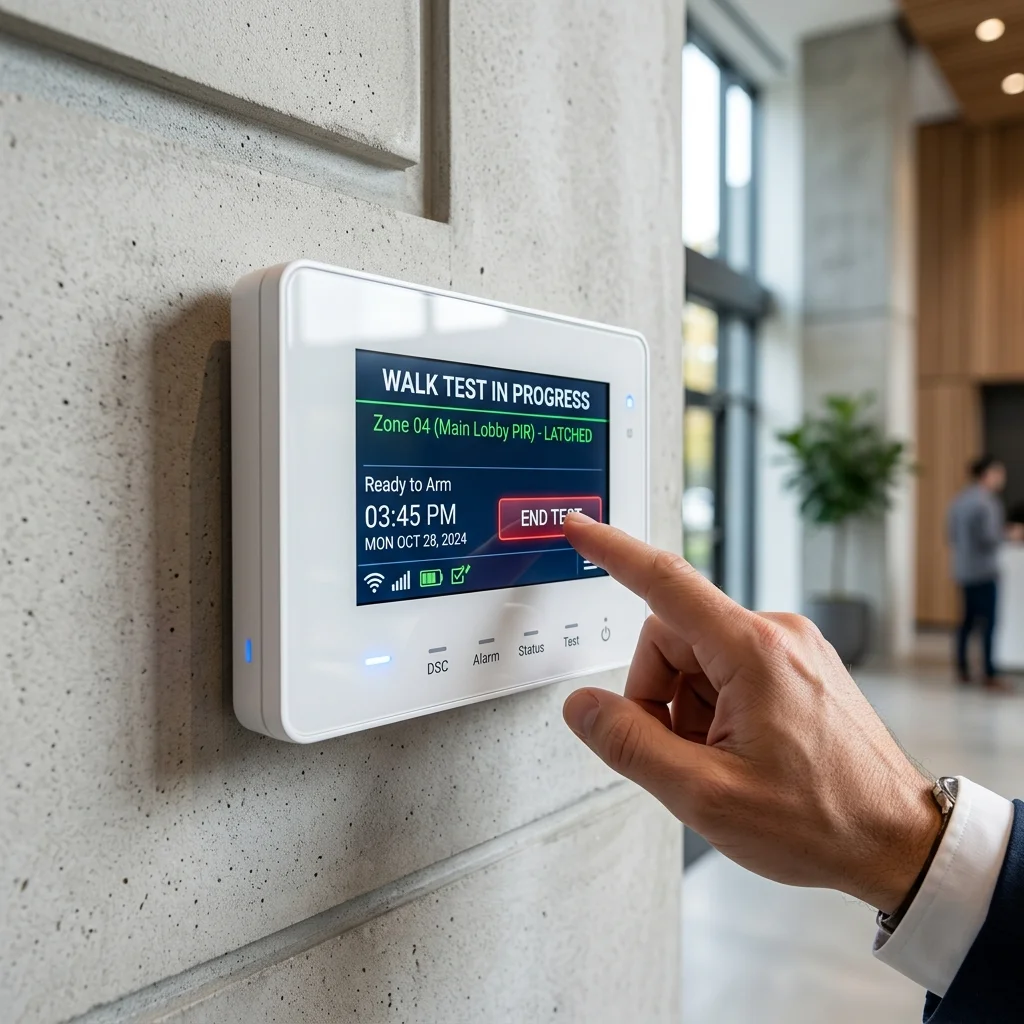
Annual servicing: testing sensors, batteries and communication paths.
Like any security system, a burglar alarm requires periodic maintenance. A system that is never tested may not perform as expected during an actual incident.
How Long Should an Alarm System Last?
A well-maintained alarm system from a reputable manufacturer can provide 10 years or more of reliable service. The control panel and wired sensors typically have the longest service life. Wireless sensor batteries require periodic replacement: most sensors provide 2 to 5 years of battery life depending on the sensor type and transmission frequency. The backup battery in the control panel typically requires replacement every 3 to 5 years. Most modern systems provide advance warning when battery replacement is approaching: do not ignore these warnings.
When to Replace Rather Than Repair
Control panels and sensors from older platforms eventually reach a point where the manufacturer no longer supports them: spare parts become unavailable and firmware updates cease. As a general guide, a system more than 10 years old, generating increasing fault rates, or whose platform is no longer actively supported, should be assessed for replacement rather than further repair. A replacement also provides an opportunity to benefit from improvements in wireless technology, smartphone integration, and dual-path communication that older systems cannot support.
Monthly Checks
The most useful monthly check is a walk test: arm the system in walk-test mode (most control panels provide this specifically so sensors can be tested without triggering the full alarm), move through the protected zones, and confirm that each sensor activates as expected. Check that smartphone notifications are received correctly. Confirm that the system arms and disarms correctly from both the keypad and the application.
Annual Servicing
Professional servicing should be carried out annually and should include: physical testing of all sensors; battery testing and replacement where required; communication path testing to confirm both reporting paths are functioning; tamper circuit verification; full system event log review; and visual inspection of all sensor mounting positions. Small problems identified during annual servicing are almost always easier and less expensive to resolve than those discovered during an actual alarm event.
Renovation Works and the Alarm System
In Singapore, renovation works frequently disturb or damage existing alarm systems. Dust accumulation in sensors, vibration during drilling and hacking, and physical interference with sensor positions are common causes of post-renovation alarm faults. Before renovation works begin, inform your alarm installer. A renovation is also the best opportunity to upgrade or extend the alarm system: cabling can be run while walls and ceilings are open, at a fraction of the cost and disruption of doing so in a completed property.
When You Move or Sell the Property
When a property changes hands, user codes should be reset, keyholder contact information updated, and any CMS monitoring account transferred or terminated before the property changes hands. A system sold with old user codes still active, or with a CMS account in the previous owner's name, creates both a security gap and a potential liability. Ensure this is addressed as part of the property transaction process.
11. Security Hardening
A burglar alarm should not be viewed as a standalone solution. It is one layer in a broader security strategy, and it performs best when combined with other measures that complement and reinforce it.
Research on residential burglary consistently shows that most opportunistic intruders make their target selection decision based on visible signals: whether the property appears occupied, whether security measures are visible, and whether the perceived effort and risk outweighs the likely reward. This means visible security measures contribute to deterrence before any sensor is ever triggered.
Effective complementary measures include: good quality locks on all doors and windows: an alarm system does not compensate for a weak lock; CCTV cameras positioned to cover entry points and provide clear facial and vehicle identification; security lighting that activates on motion around entry points and side passages; perimeter fencing or boundary measures that create a physical barrier and a visible signal; and alarm signage and external siren boxes that make the presence of the alarm system visible from the street. The strongest security outcomes come from multiple layers working together. An intruder who encounters visible CCTV, visible alarm signage, security lighting, and physical barriers faces a very different risk calculation from one approaching an unprotected property.
12. Common Problems and Questions
Most alarm issues have straightforward causes. Understanding the symptoms helps property owners decide whether the issue is minor or whether professional attention is needed.
When we investigate a system with recurring false alarms, the cause is almost always one of three things: a PIR detector aimed directly at an air-conditioning outlet; a door or window contact on a frame that has shifted slightly over time, causing intermittent break in the magnetic circuit; or a wireless sensor with a depleted battery generating inconsistent signals. In almost every case the fix is straightforward once the actual cause is identified.
| Problem | Most Common Cause | First Check |
|---|---|---|
| Alarm keeps going off | Incorrect sensor placement, weak battery, or environmental trigger | Check PIR orientation relative to air-con vents and sunlight. Check sensor batteries. Contact installer if recurring: SPF fines apply in Singapore |
| Alarm beeping continuously | Low battery warning, mains power fault, or communication fault | Check keypad or app display for fault code before calling for service |
| No notification received on phone | Internet or mobile communication path failure | Check internet connection and SIM status on the communicator module |
| System will not arm | Open zone fault: a sensor is reporting open or fault | Check keypad display for which zone is faulting. Inspect that sensor |
| Sensor not triggering alarm | Zone bypassed, battery depleted, or sensor fault | Check zone is not bypassed in the panel. Test sensor in walk-test mode |
| System not communicating with monitoring centre | IP or GSM communication path failure | Contact monitoring centre to confirm last polling time. Check communicator module |
| Alarm sounds but no notification received | Communication path failure or app notification settings | Check phone notification permissions for the alarm app. Check dual-path communication status |
13. Choosing a System: What to Look For
Selecting an alarm system involves more than comparing feature lists and price points. The factors that most affect long-term satisfaction are rarely the ones that appear most prominently in a brochure.
Verify Your Installer's PLRD Licence
In Singapore, companies installing burglar alarm systems are required by law to hold a licence issued by the Police Licensing and Regulatory Department (PLRD) under the Private Security Industry Act (PSIA). This is not a voluntary accreditation: it is a legal requirement. The licensing regime was introduced specifically because unlicensed alarm installations were a significant source of chronic false alarm problems in Singapore. An unlicensed installer is operating outside the law, and a system installed without proper licensing may not be recognised by your insurer.
Before engaging any alarm installer, ask to see their PLRD licence and verify that it is current. A licensed installer will provide this without hesitation. Securevision holds Police Licence L/PS/000267/2023P and has maintained its licence since the licensing regime began. A PLRD licence is the minimum legal standard: it confirms that the company is eligible to install alarm systems. It does not, by itself, guarantee quality of design, quality of installation, or quality of after-sales support. The licence is the starting point for the evaluation, not the end of it.
The CP16 Standard
For commercial installations and any property where the alarm system must meet insurance or regulatory requirements, there is a further standard worth understanding. CP16 is Singapore's Code of Practice for the Installation of Burglar Alarms: the technical standard that governs how alarm systems must be designed and installed to comply with insurance and regulatory requirements. For commercial properties where CMS monitoring is a condition of the insurance policy, the insurer may require that the installation complies with CP16, covering aspects including sensor placement, control panel location, communication requirements, and documentation standards. For most residential installations, CP16 compliance is not a formal requirement. For commercial and industrial properties handling high-value goods or operating under specific licensing conditions, confirm with your insurer whether CP16 compliance is expected before finalising the system specification. An experienced licensed installer will be familiar with CP16 requirements and can advise accordingly.
Local Support and Spare Parts Availability
An alarm system is a long-term investment. The platform you choose should have established local distribution and accessible spare parts in Singapore. A system that cannot be serviced because parts are unavailable is a system that cannot be properly maintained.
System Expandability
Your requirements may change: you may want to add sensors, integrate new systems, or extend protection to new areas. Choose a platform that supports expansion without requiring the entire system to be replaced. Confirm expandability with your installer before committing to a platform.
Installer Experience and After-Sales Support
The same hardware performs very differently depending on who designs and installs it. An installer with deep experience of the platform will configure it more effectively, troubleshoot faults more quickly, and support it more reliably over its service life. Ask how service calls are handled, what the typical response time is, and whether annual servicing contracts are available. An installer who is difficult to reach before the sale will not become easier to reach after it.
Compatibility with Other Systems
If you have or plan to have CCTV, access control, or smart home systems, confirm that the alarm platform can integrate with them effectively. Integration should be verified: not assumed based on marketing claims.
A burglar alarm is not just a siren that makes noise when someone breaks in. When properly designed and correctly installed, it forms the detection and alerting layer of a broader security strategy that deters intruders, identifies incidents as they occur, and ensures the right people are notified in time to respond. The most important decisions are not about brand or specification. They are about whether the system is properly designed for the property and its specific risks; whether the sensors are correctly selected and correctly placed; whether the monitoring arrangement ensures that someone who can act is always notified when the alarm activates; and whether the installer holds a valid PLRD licence and will still be available to support the system years after the installation is complete. A well-designed, properly maintained alarm system provides years of reliable protection and genuine peace of mind. Take the time to get the design right. Verify your installer's licence. Specify monitoring that matches the property's risk profile. And choose an installer whose commitment extends well beyond the day of installation.
Frequently Asked Questions
Do burglar alarms work during a power failure?
Yes. Alarm systems include backup batteries that maintain operation during power outages. The control panel backup battery typically provides several hours of operation. Wireless sensor batteries are independent of the mains supply.
Can my pet trigger the alarm?
With correctly specified and correctly installed pet-immune sensors, the risk is low for animals under approximately 25 kilograms. Correct sensor placement is essential: discuss your pets with your installer during the design stage.
Will the alarm work if my internet connection goes down?
The alarm continues to operate and sound locally. If the system has mobile network communication as a backup reporting path, remote notifications continue to be delivered. If the system relies only on internet-based reporting, remote notification will be interrupted until the connection is restored: this is one reason dual-path communication is worth specifying.
Can I control my alarm from my phone?
Most modern alarm platforms support smartphone applications for remote arming, disarming, status checking, and notification receipt.
How often should alarm batteries be replaced?
Wireless sensor batteries typically last 2 to 5 years. The control panel backup battery typically requires replacement every 3 to 5 years. Most systems provide advance warning before replacement is needed : act on these warnings promptly.
Do I need professional monitoring?
Securevision recommends monitoring for all installations. For most Singapore residential properties, smartphone self-monitoring provides a good balance of cost and capability. For higher-risk sites, frequently unoccupied properties, or where insurance requires it, CMS monitoring is the appropriate choice.
What is the difference between self-monitoring and CMS monitoring?
Self-monitoring sends alarm notifications directly to the owner's smartphone: the owner decides what action to take. CMS monitoring routes the alarm signal to a professional monitoring centre staffed around the clock, where trained operators follow a structured response procedure. CMS monitoring provides coverage when the owner is unreachable: self-monitoring does not.
Does professional monitoring guarantee a police response?
No. The Singapore Police Force does not dispatch officers in response to unverified alarm activations. Professional monitoring means a trained operator follows a response procedure and attempts to reach keyholders. It does not guarantee an immediate police or security guard response to the property.
Do I need to verify my installer's licence?
Yes. In Singapore, alarm installers are required by law to hold a PLRD licence under the Private Security Industry Act. Ask to see the licence before engaging any installer. An unlicensed alarm installation may not be recognised by your insurer and the installer is operating outside the law.
What is CP16?
CP16 is Singapore's Code of Practice for the Installation of Burglar Alarms: the technical standard governing how alarm systems must be designed and installed for compliance with insurance and regulatory requirements. Relevant primarily for commercial and industrial installations where insurance compliance is a requirement.
Can burglars disable alarm systems?
A professionally installed system with tamper protection, dual-path communication, and backup power is significantly more difficult to defeat than a basic system. No system is completely defeat-proof, but a well-specified system raises the effort required to a level that most opportunistic intruders will not attempt.
How long does installation take?
Most residential alarm installations can be completed within one day. Larger commercial or industrial installations may require additional time depending on the number of sensors and the scope of cabling works.
Can I expand the system later?
Most modern alarm platforms allow additional sensors and devices to be added as requirements change. Confirm expandability with your installer before committing to a platform.
Will the alarm integrate with my CCTV system?
Many modern alarm platforms support integration with CCTV systems, allowing alarm events to trigger camera recording and enabling visual verification of activations via the smartphone application.
What happens when I sell or move out of the property?
User codes should be reset, keyholder contact information updated, and any CMS monitoring account transferred or terminated before the property changes hands. Engage your alarm installer to manage the handover properly.