- Security systems fail silently; a live camera image does not confirm that recording is working or that footage can be retrieved.
- The most important CCTV test is playback, not live view. Search for recordings from the past week before assuming the system is healthy.
- Alarm backup batteries degrade without showing a fault. Batteries over three years old should be assessed and replaced proactively.
- Door access and auto gate systems fail gradually; intermittent reader faults and slow gate movement are early warnings, not minor inconveniences.
- A simple annual health check across all five systems takes less than an hour and identifies most hidden faults before they become incidents.
- CCTV footage is personal data under PDPA. Retention periods must be justified; retaining footage longer than necessary creates legal exposure, not additional security.
The systems that fail before you know it
One of the most uncomfortable conversations we have with property owners happens after something goes wrong. A parcel goes missing. A vehicle is damaged overnight. Someone enters the property without authorisation. The owner is confident the CCTV will have the answer. The cameras are showing a live image. The mobile app appears normal. Everything seems fine.

Unfortunately, when they attempt to retrieve the footage, they discover that the recorder stopped writing to disk months earlier because of a failed hard drive. The cameras had continued displaying live images because the network was intact, but nothing had been saved. The system had been performing one of its two jobs and failing silently at the other.
This is not an unusual situation. We encounter it regularly across residential properties, condominiums, and commercial premises. In most cases, the equipment itself was not old. The issue was simply that nobody had verified whether the system was still performing its intended function. A security system that appears to be working but is not is more dangerous than one that has visibly failed; because it creates false confidence that leads owners to take no action.
KEY POINT
The question to ask is not simply "Is it working?" The better question is "Can I still depend on it when I need it most?" A live image answers the first question. Only a playback test answers the second.
Security systems rarely fail overnight. Most deteriorate gradually. A camera may still produce an image, but the resolution may have degraded to the point where a face or vehicle number plate cannot be identified. An intercom may still ring, but mobile notifications may no longer reach the resident after a phone upgrade. An access control system may continue unlocking doors, but spare parts may no longer be available when something eventually breaks. The five sections below walk through how to check each system type; alarm, CCTV, intercom, door access, and auto gate; so you know what a healthy system looks like before you need to find out the hard way.
Checking your burglar alarm
A burglar alarm is only useful if it can detect a breach, communicate that breach to a monitoring centre or your phone, and sound a deterrent. All three functions need to be verified separately; they can and do fail independently of one another.
Start at the keypad. Most modern alarm panels display a status indicator that distinguishes between armed, disarmed, and fault conditions. A fault symbol or persistent beep means the panel has already identified a problem and is waiting for someone to read it. Do not simply silence the beep; read the fault menu and understand what the system is trying to tell you. Common fault messages include zone tamper, communication failure, and low battery. Each has a different cause and a different remedy.
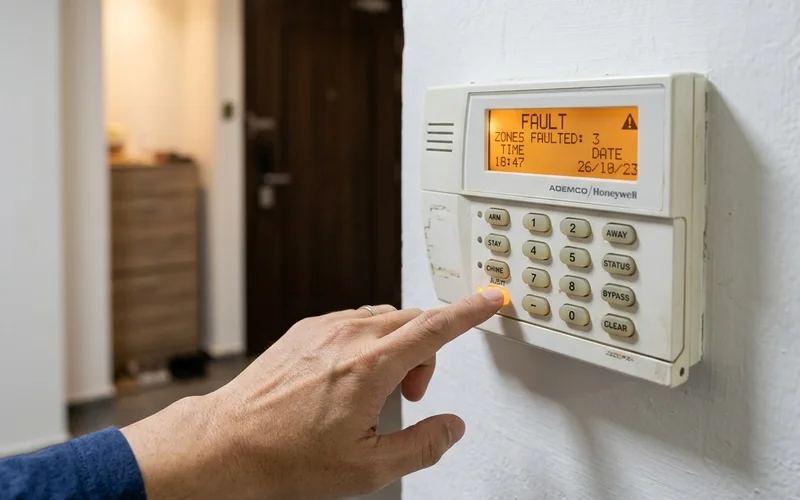
Review the alarm event history if your panel supports it. Look for repeated communication failures, zones frequently reported as offline, unexpected activations at unusual hours, or low battery warnings that have recurred over several weeks. A one-off event may be a fluke. A pattern of events is a system telling you it needs attention.
Test the communication path with your monitoring centre or mobile app. Arm the system, trigger a detector deliberately, and confirm that the alert reaches its intended destination; whether that is a monitoring operator calling you back or a push notification arriving on your phone. Always notify your monitoring centre before conducting any test to avoid an unnecessary police call-out. If you have changed phones or updated your operating system since the last test, notifications are particularly likely to have broken silently.
Check the backup battery. Most alarm panels use a sealed lead-acid battery that maintains power during a mains outage. These batteries degrade over time without displaying a fault until they are close to failure. As a general rule, batteries older than three years should be assessed and replaced proactively, even if no fault has appeared. Finally, perform a walk-test: arm the system and trigger every door contact, window contact, and motion sensor in sequence, confirming that each zone registers correctly on the keypad display. This test should be done at least once a year.
PLANNING POINT
If your alarm communicates via a landline or PSTN connection, be aware that Singapore's telephone infrastructure has been transitioning away from analogue lines. Alarm panels that have not been upgraded to communicate via mobile network or IP may have lost their communication path without displaying a fault.
Checking your CCTV system
CCTV systems serve two distinct functions: live monitoring and evidence recording. Most owners only ever test the first. Verifying live camera images is necessary but not sufficient; the recording function must be tested separately and regularly.
Begin by confirming that every camera channel shows a clear live image. Black screens, frozen frames, or channels displaying the wrong timestamp should be investigated immediately. A black screen usually means a camera has failed or lost power. A frozen frame means the camera is alive but the network path to the recorder has broken. A wrong timestamp means the recorder's clock has drifted, which will cause retrieval problems when footage is needed and a time reference matters.
The single most important check is playback. Navigate to yesterday's recordings and confirm that footage exists and plays back smoothly. Then search for recordings from several weeks ago. If footage from last week exists but footage from three weeks ago does not, your retention period has shortened; likely because camera resolution was increased at some point without the storage being expanded to match. Know how many days of recordings you actually have, not how many days you originally specified when the system was installed.
KEY POINT
Securevision's standard recommendation is 30 days of continuous recording. This is not a legal requirement under Singapore law, but it is the practical minimum for most property disputes and incident investigations. Footage older than 30 days is rarely retrievable in time to be useful. Footage deleted after 7 days often fails to cover the date a complaint is eventually filed.
CCTV footage is personal data under the Personal Data Protection Act (PDPA). If your system captures images of individuals, which virtually all outdoor and common area cameras do; you are obliged to retain that footage only for as long as it serves its stated purpose. Retaining footage indefinitely is not more secure; it creates legal exposure. Review your retention settings against your data protection obligations and ensure they are consistent.
Beyond recording, check the quality of each camera image. Zoom into a number plate or a face in the live view and assess whether you could actually identify an individual or vehicle from the image. Resolution that was adequate three years ago may be inadequate today if the environment has changed; new lighting, repositioned fixtures, or vegetation growth altering camera sightlines. A camera that produces an image but cannot produce usable evidence has not fully done its job.
Checking your video intercom
A video intercom is a complete communication system, not simply a camera at the gate. It must receive a visitor call, transmit a clear image to the indoor monitor or mobile app, allow two-way audio, and release the door or gate on command. Each of these functions can fail independently, and owners frequently discover a failure only when a visitor is standing at the gate wondering why nobody is answering.
Test the entire visitor journey. Press the call button at the entrance panel and verify that the indoor monitor rings. Check that the image is clear and correctly framed; the visitor's face should be visible at normal standing height without the camera pointing at their chest or the sky. Confirm that two-way audio works in both directions: the resident should be able to hear the visitor and the visitor should be clearly hear the resident's voice. Then test remote door or gate release and confirm the lock or strike responds correctly.

If your intercom system supports a mobile app, test the app call separately. Mobile app notifications are particularly susceptible to breaking silently after a phone replacement, an operating system update, or a change in Wi-Fi or mobile data settings. Many residents assume that because the indoor monitor still works, the mobile app is also working; the two are independent paths and must be tested independently.
For wired intercom systems, blurry or faded images often indicate lens degradation at the entrance camera rather than a network or recording problem. Wired camera lenses exposed to Singapore's outdoor conditions; direct sun, humidity, and occasional rain, typically degrade over five to eight years. If the image is noticeably softer than it was when the system was installed, a camera head replacement is likely due rather than a full system upgrade.
Securevision's View
The intercom check most owners neglect is the mobile app test. We routinely find systems where the indoor monitor works perfectly but mobile notifications stopped reaching residents months ago after a phone upgrade. A security system that only works when you are physically at home is significantly less useful than one that alerts you wherever you are.
Checking your door access system
Door access systems are used every day, which creates a paradox: the familiarity of daily use makes it easy to overlook developing problems. A reader that occasionally rejects a valid card before accepting it on the second attempt is a reader that is beginning to fail. A door that requires a firm push to latch after the strike releases is a door closer that is losing tension. Neither of these announces itself as a security fault, but both degrade the reliability of the access control system over time.
Test every credential type the system supports. If the system accepts cards, fingerprints, and a PIN code, test all three, not just the one you use daily. Access control systems can develop faults that affect one credential type while leaving others functional. A fingerprint reader that fails in humid conditions is a common example: it may work perfectly in an air-conditioned lobby but reject fingerprints in an outdoor or semi-outdoor location during wet weather.
Inspect the physical door hardware separately from the electronic reader. Observe whether the door closes fully and positively latches after every use. A door that rests against the frame without latching because the closer is weak or the latch has worn may appear to be secured but can be pushed open without a card or credential. The access control reader may be functioning correctly while the door itself provides no meaningful resistance.
KEY POINT
Fail-safe locks (locks that release when power is lost) and fail-secure locks (locks that remain locked when power is lost) behave differently during a power outage. Know which type is installed on each door in your property and confirm the behaviour is appropriate for that door's risk level. A fire exit should always be fail-safe. A server room door should generally be fail-secure.
Review the access log if your system maintains one. Unusual access patterns; credential attempts outside normal hours, a high rate of rejected attempts on a specific reader, or credentials that appear to be in use at times when the assigned user should not be on premises; are worth investigating. The log is also the first place to look if a security incident is later reported and access records are needed as evidence.
Checking your auto gate
Auto gates are often the most neglected security system on a residential property precisely because they appear to be working as long as they open and close. Mechanical wear, degrading safety sensors, and failing battery backup systems are all invisible to a casual observer until they cause a problem, which in the case of auto gates can mean a gate that will not open during a power failure, a safety sensor that no longer detects obstacles, or a motor that fails during operation and leaves a vehicle or person in the gate's path.
Test normal operation by opening and closing the gate several times in succession. Listen for unusual sounds; grinding, clicking, or a change in the characteristic hum of the motor. Watch the movement speed and smoothness: a gate that is slower than it was six months ago, or that hesitates at the start or end of its travel, is showing early signs of mechanical wear or motor strain. Intermittent operation; the gate that sometimes works on the first remote press and sometimes needs two or three attempts; is not a remote control battery problem unless replacing the battery resolves it completely and permanently.
Test the safety sensors. Auto gates are required to stop and reverse when an obstacle is detected in the gate's path. Place an object in the gate's travel path and confirm that the gate detects it and reverses before making contact. If the gate continues to close against the obstacle, the safety sensor has failed and the gate presents a safety hazard in addition to a security concern. This is the most important test and the one most frequently skipped.
KEY POINT
Auto gates with battery backup should be tested by deliberately switching off the mains power supply and confirming that the gate continues to operate normally on battery. A battery backup system that has never been tested under a real power interruption may have degraded to the point where it provides only a few seconds of operation rather than the full duty cycle it was originally specified for.
Verify that all remote controls on the property operate the gate reliably. Lost or unaccounted for remotes are a security concern; anyone holding a remote to your gate has effective access to your property without triggering any access log. If a remote is unaccounted for, reprogramme or replace the receiver to invalidate the missing unit.
A simple annual health check schedule
Most of the checks described above take only a few minutes each. The complete set; alarm, CCTV, intercom, door access, and auto gate; can be worked through in under an hour by a property owner with no technical training. The value is not in the sophistication of the test but in the discipline of doing it consistently, once a year, before a problem turns into an incident.
For the burglar alarm: check the keypad for fault indicators, review the event history for patterns, and perform a walk-test of every detector zone. Confirm that notifications reach your phone by triggering a supervised test with your monitoring centre on notice. Assess the backup battery age and replace it if it is approaching or past three years.
For the CCTV system: confirm every camera is online and showing a clear live image with a correct timestamp. Search for playback from yesterday and from three weeks ago. Confirm the number of recording days you actually have. Review camera image quality for any individual camera that may have degraded.
For the video intercom: test the complete visitor journey; call button, indoor monitor, two-way audio, and door or gate release. Test the mobile app notification path separately. Assess the entrance camera image quality for any signs of lens degradation.
For door access: test every credential type on every reader. Physically inspect each door to confirm it closes and latches fully. Confirm that fail-safe and fail-secure behaviour on critical doors is appropriate for their risk level. Review the access log for unusual patterns.
For the auto gate: run the open-close cycle several times, listening and watching for signs of mechanical wear. Test the safety sensor with an obstacle in the gate's path. Test battery backup under a deliberate mains outage. Confirm all remotes are accounted for and that any missing units have been invalidated.
PLANNING POINT
If any of these checks reveals a fault, address it before assuming the system is still providing protection in the meantime. A system with a known unresolved fault is giving you false confidence, not partial security. Small faults rarely resolve themselves; they typically worsen gradually until a complete failure occurs at the worst possible moment.
For property owners who find it difficult to maintain this schedule consistently, a professional annual maintenance visit achieves the same outcome and adds a layer of technical inspection that an owner check cannot; firmware currency, cable integrity, mechanical torque measurement on gate motors, and calibration of safety sensors. The cost of an annual maintenance visit is a small fraction of the cost of discovering a system failure during an actual security incident.
Securevision's View
We do not recommend annual maintenance visits as a revenue exercise. We recommend them because the checks described in this article are routinely skipped, and because we have had too many conversations with property owners after an incident where everything looked fine until it was not. If you have the discipline to work through this checklist once a year yourself, that is entirely sufficient for most residential and small commercial properties. If you do not, professional eyes once a year cost far less than the consequences of discovering a silent failure at the wrong moment.
In Short
Security systems fail silently and gradually. A live camera image does not mean footage is being recorded. A quiet alarm keypad does not mean every detector is working. An auto gate that opens and closes does not mean the safety sensors are functioning. Testing each system once a year; alarm walk-test, CCTV playback check, intercom full-journey test, access credential verification, and auto gate safety sensor test; takes less than an hour and identifies most hidden faults before they become incidents. The 15 minutes you spend on this today is worth more than the conversation you will have after an incident reveals what was already broken.

Frequently asked questions
How often should I test my security systems?
For most residential and small commercial properties, a basic annual health check covering all five system types; alarm, CCTV, intercom, door access, and auto gate; is sufficient. Critical or high-footfall facilities may benefit from checks every six months. The key is consistency: an annual check done reliably is worth far more than a quarterly check done sporadically.
My CCTV cameras are showing a live image. Does that mean the system is working?
A live image confirms that the camera is powered and connected to the network. It does not confirm that footage is being recorded, that the hard drive has sufficient space, or that recordings can be retrieved. Always test playback; search for footage from the past week and confirm it plays back smoothly before concluding the system is healthy.
How long should CCTV footage be kept?
Securevision's standard recommendation is 30 days of continuous recording. Under Singapore's PDPA, footage should not be retained for longer than necessary for its stated purpose. Retaining footage indefinitely creates legal exposure. Thirty days balances practical investigative value against data protection obligations for most property types.
How long do alarm backup batteries last?
Most sealed lead-acid alarm backup batteries perform reliably for two to three years. After three years, performance begins to degrade; the battery may still pass a basic float charge test but may not sustain the panel through a prolonged power outage. Proactive replacement at three years avoids the risk of a battery failing silently under real conditions.
My burglar alarm communicates via a phone line. Is that still reliable?
Singapore's analogue telephone network has been progressively decommissioned. Alarm panels relying on PSTN (standard phone line) communication may have lost their signalling path without displaying a fault on the keypad, because the panel cannot distinguish between a connected but inactive line and a disconnected one. If your alarm was installed more than five years ago and has not been upgraded to communicate via mobile network or IP, this should be verified as a priority.
What is the difference between a fail-safe and a fail-secure door lock?
A fail-safe lock releases (unlocks) when power is lost. It is used on fire exits and emergency egress doors where people must always be able to exit freely regardless of power status. A fail-secure lock remains locked when power is lost. It is used on secure areas; server rooms, cash handling areas, controlled access zones, where maintaining the locked state during a power failure is the correct security response. Knowing which type is on each door in your property matters when testing backup power behaviour.
Can I do these checks myself or do I need a professional?
Most of the checks described in this article can be performed by a property owner with no technical background. Playback testing, walk-testing alarm detectors, testing intercom audio, and running the gate safety sensor test all require no specialist tools. Professional maintenance visits add value in areas an owner cannot easily assess; firmware currency, cable integrity, motor torque measurement, and safety sensor calibration, but are not essential for the annual functional check.
My auto gate opens and closes normally. Does that mean it is working correctly?
Normal operation in clear conditions does not confirm that the safety sensors are functioning, that the battery backup will sustain operation during a power failure, or that the motor is not showing early signs of wear. Test the safety sensor by placing an obstacle in the gate's travel path and confirming that the gate stops and reverses before making contact. Test battery backup by switching off the mains supply and confirming continued operation.
My intercom indoor monitor works fine. Is it safe to assume the mobile app also works?
No. The indoor monitor and the mobile app are independent signal paths. The monitor receives its call signal via the wired intercom network inside the building. The app receives its notification via the internet, through a server, and via your phone's push notification system. Any break in the internet path, a change in your phone, or an app update can sever the mobile path while leaving the indoor monitor completely unaffected. Test both paths separately.
What should I do if I find a fault during my annual check?
Address it before the next check; do not log it and wait. A known, unresolved fault means the system is providing false confidence rather than real protection. Most faults identified during an annual health check are straightforward to resolve: battery replacement, firmware update, cable reconnection, or reader head replacement. The cost is typically modest. The cost of discovering the same fault during an actual security incident is significantly higher in every sense.
Is there a Singapore regulation requiring property owners to test their security systems?
There is no general legislative requirement for residential or commercial property owners to conduct periodic security system checks. However, certain regulated environments; licensed premises, MOM-regulated worksites, and MCST-managed estates with security obligations under the Building Maintenance and Strata Management Act (BMSMA); may have specific maintenance obligations arising from their licences, management contracts, or by-laws. For most property owners, the obligation is a practical one rather than a legal one: a system that cannot perform its function provides no protection.