
1. What Is an Intercom System?
An intercom system allows people at an entrance to communicate with someone inside a building before access is granted. Whether it is a visitor at your front gate, a delivery driver at a condominium lobby, or a contractor arriving at an office, the intercom provides a way to verify who is there before opening the door. In many properties today, it has become the first and most important layer of security.
An intercom system lets you see and speak with visitors before granting access: it is the first layer of security at any entrance. Modern IP intercoms use the same network cabling as CCTV and access control, making integration and expansion straightforward.
Cloud-based intercoms route visitor calls to your smartphone, so you can answer from anywhere and release the door remotely. For most new Singapore installations: residential or commercial: a video intercom with mobile app support is the recommended starting point.
The right intercom depends on your property type, visitor volume, and whether you need access control integration at the same entrance. A site survey before specifying any system is essential: in our experience, the most common intercom mistakes happen before any equipment is ordered.
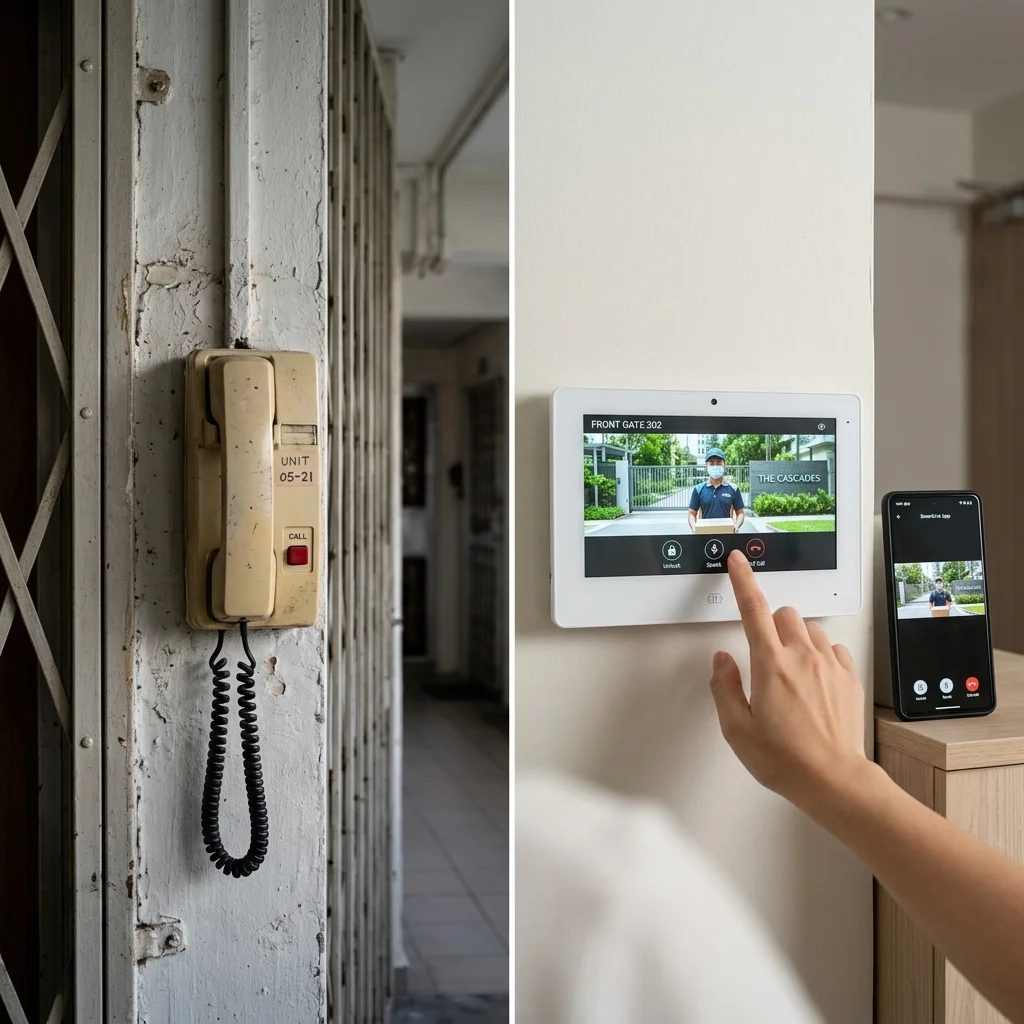
Six decades of evolution: from a simple analogue audio handset to a cloud-connected touchscreen with facial recognition and mobile app integration.
The core function is simple: allow two people in different locations within the same property to communicate instantly, and allow the person inside to decide whether to grant access. A visitor at your front gate can speak with someone inside the house. A delivery driver at the condominium lobby can call the resident directly. A contractor arriving at an office can be verified by the receptionist before the door is released. Most modern intercom systems do much more than voice communication: they can display live video of visitors, allow doors and gates to be opened remotely, record visitor activity, and send calls directly to a smartphone.
In our experience across hundreds of Singapore properties, the intercom is the single most used security device in any building. Access control and CCTV are important, but the intercom is what residents and staff interact with every day. Getting it right: the right technology, the right placement, the right integration: has a direct and visible impact on how secure and convenient a property feels to everyone who uses it.
The Evolution of Intercom Technology
- 1960s–1980s: Audio Handsets: Simple audio-only devices with handsets. A visitor pressed a button, a bell rang inside, residents picked up a handset to speak. Basic analogue circuitry, dedicated wiring, manual door release.
- 1990s: Video Integration: Small CRT monitors brought visual verification. Residents could see who was at the door before opening. Separate cables for audio, video, and power.
- 2000s: Digital IP Systems: Network-based intercoms using CAT6 Ethernet enabled higher quality, longer distances, and integration with other building systems. Recording became standard.
- 2010s–Present: Cloud and Mobile: Modern intercoms connect to the internet. Residents answer door calls on smartphones from anywhere in the world. Facial recognition, QR codes, and temporary digital keys have replaced traditional visitor management methods.
Modern Intercom Capabilities
| Capability | What It Does |
|---|---|
| HD Video | 2–4MP cameras with 140–180° wide-angle lenses and IR night vision for clear visitor identification in complete darkness |
| Mobile App | Push notification when visitor presses button: see live video, speak with visitor, and release door from smartphone anywhere |
| Access Control | Built-in card readers, keypads, fingerprint sensors, or facial recognition: authorised users enter without calling anyone |
| Call Recording | Automatic snapshots or video recordings of every caller, time-stamped and stored in cloud or local server |
| Weather Resistance | IP65/IP66 rated outdoor stations for Singapore's tropical climate: heavy rain, high humidity, intense equatorial sun |
What an Intercom Cannot Do
An intercom is one of the most useful security devices in any building, but understanding its limitations is just as important as understanding what it can do.
Many people assume that if they can see and speak with a visitor before opening the door, they have solved the security problem. In reality, the intercom is only one layer of a broader strategy.
An intercom can help verify who is at the entrance. It cannot guarantee that the person is who they claim to be. It cannot prevent someone from following an authorised visitor through an open door. It cannot stop a resident from admitting someone they should not have let in. And it cannot compensate for a building where doors are routinely propped open or where the intercom process is treated as an inconvenience rather than a security measure.
Like CCTV and access control, an intercom works best when it is part of a larger security approach: not when it is relied upon as the only line of defence. The objective is not to rely on a single device. The objective is to create layers of protection that work together, each one addressing what the others cannot.
2. Intercom vs Other Systems
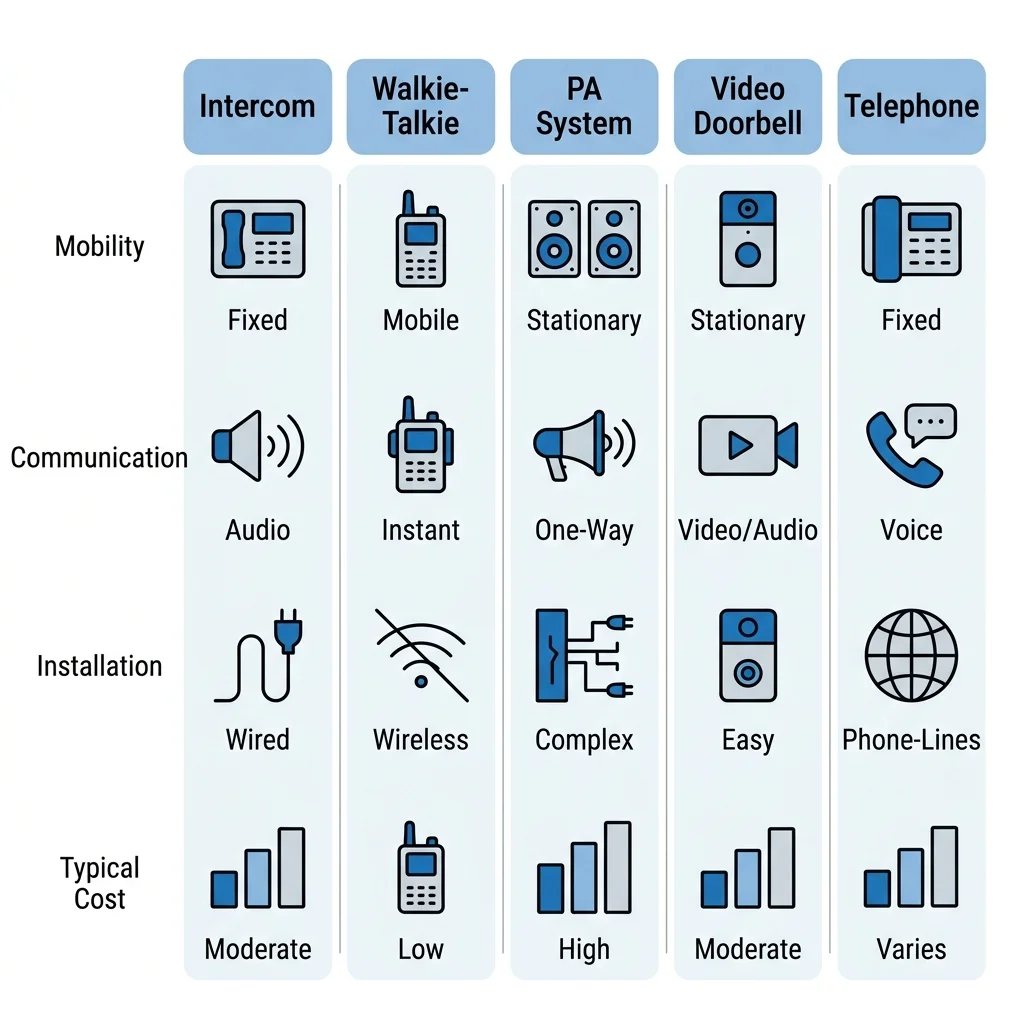
Intercoms, access control systems, and video doorbells all deal with visitors and property entry: but they serve different purposes. Understanding the difference helps you choose the right tool for each situation, and avoid specifying a system that does not match your actual requirements.
| System | What It Is | Key Difference from Intercom |
|---|---|---|
| Video Doorbells (Ring, Nest) | Wireless retrofit products for homes without existing intercom infrastructure | Battery or transformer powered, $150–$400, WiFi-connected, no dedicated indoor monitor, limited access control integration |
| PA (Public Address) Systems | One-way broadcast from a central point to multiple locations | Listeners cannot reply: announcements only. Intercoms are two-way conversation. Some advanced intercoms include PA as an additional feature. |
| Walkie-Talkies | Portable handheld radios for mobile communication | Portable and radio-based vs fixed installation. Half-duplex (press-to-talk) vs modern intercom full-duplex. No door release capability. |
| PABX / IP Telephone System | Private telephone network connecting to external phone lines | Connects to PSTN for external calls. A door phone registered to a PABX is a hybrid: both functions in one device. See our Office Telephone Guide. |
Standalone video doorbells like Ring are designed as consumer retrofit products, not professional security infrastructure. Intercom systems are complete wired installations with dedicated indoor monitors, multiple stations, and professional-grade reliability: typically costing S$900–S$5,000+ and integrating with access control, multiple indoor monitors, and building management systems.
The most common confusion we see is between intercoms and access control. An intercom manages visitors: people who do not have credentials and need to call someone for permission to enter. Access control manages authorised users: staff, residents, contractors with cards or biometrics. Most modern buildings need both, and the two systems work best when they share the same door station so a single unit handles both visitor calls and authorised user entry.
3. How Intercom Systems Work
Most intercom systems are made up of four main components. Once you understand what each one does, the whole system becomes much easier to understand: and easier to specify correctly for your property.
Core Components
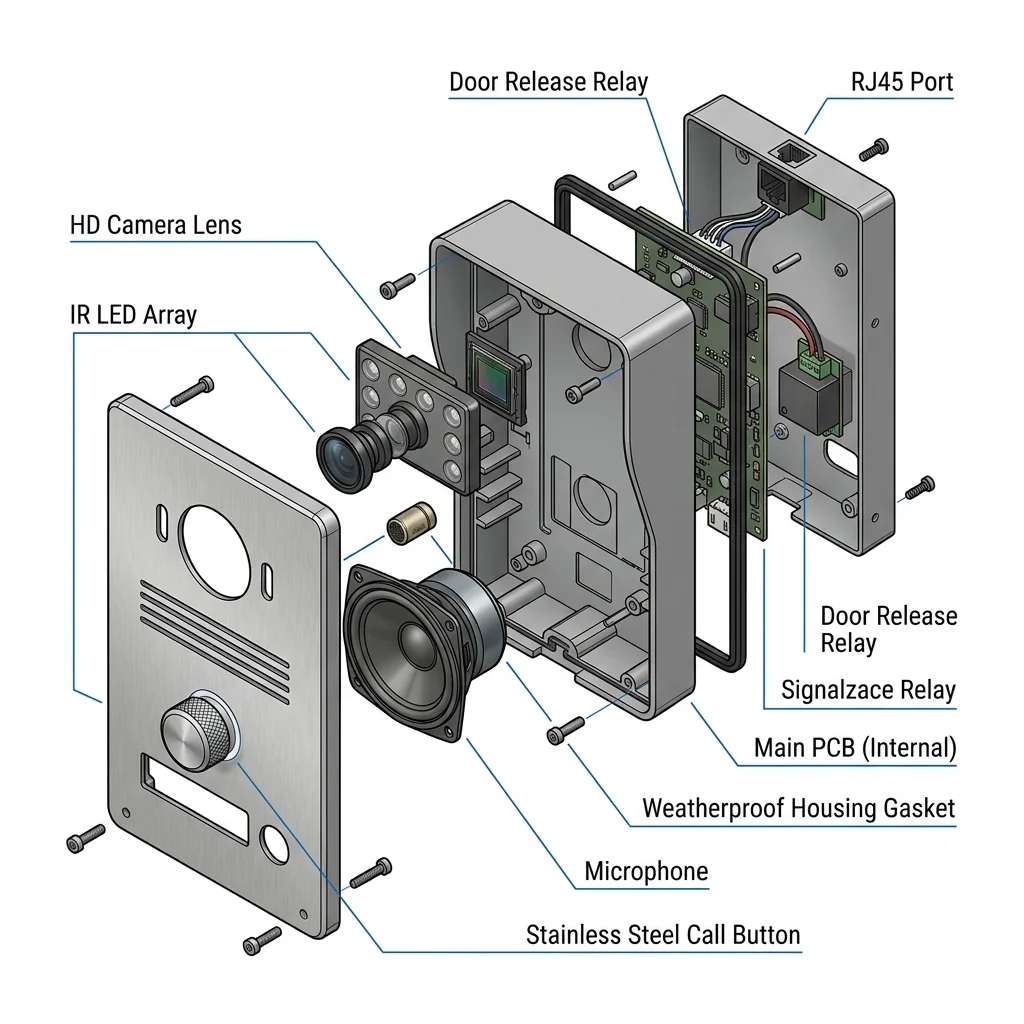
Door Station (Outdoor Unit)
The outdoor unit mounted at the entrance. Contains a call button, microphone, speaker, and camera (on video systems). IP65/IP66 rated for Singapore's weather. Modern door stations also include built-in access credential readers: RFID card, keypad, fingerprint, or facial recognition: so authorised users can enter without calling anyone inside.
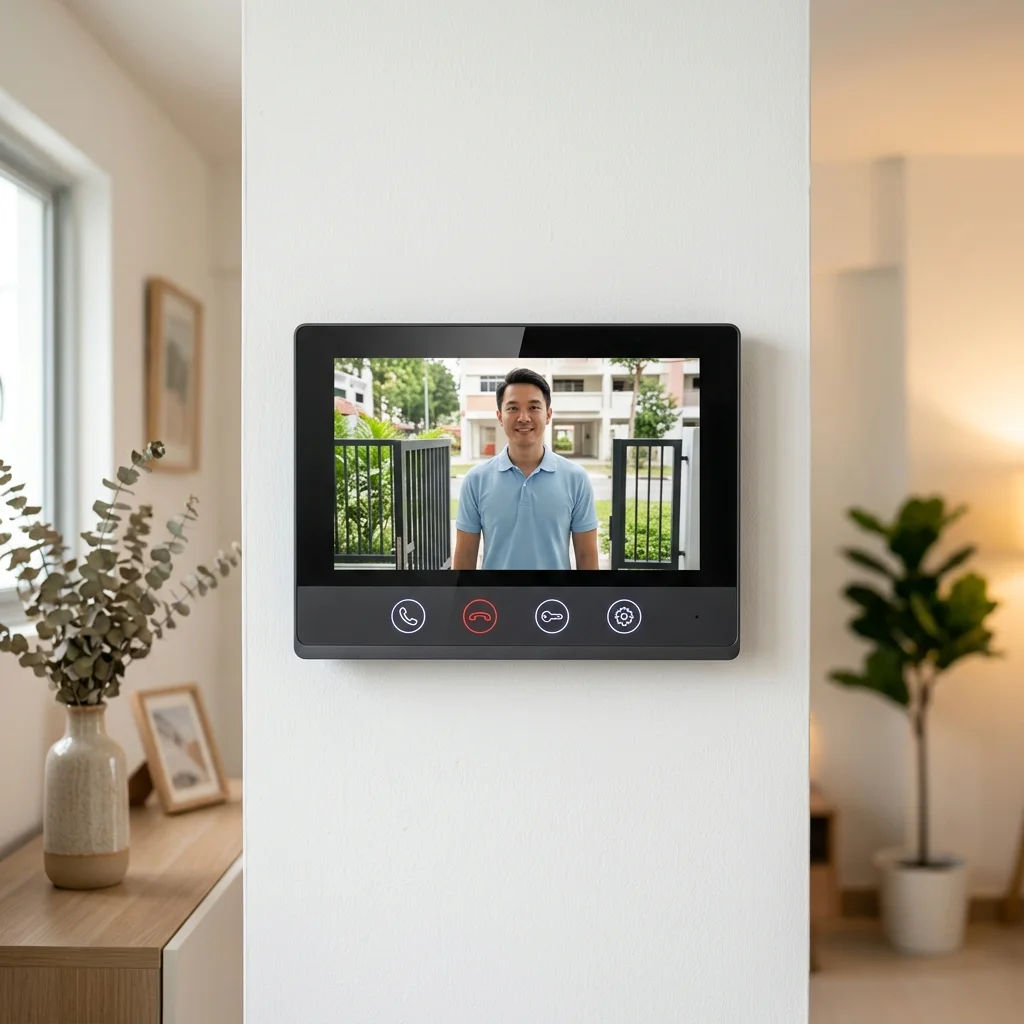
Indoor Monitor / Station
The indoor unit that receives the visitor call. Available as audio handsets (pick up to speak, greater privacy in open-plan spaces) or hands-free monitors (always-on speaker, touchscreen display). Modern IP monitors display live HD video on 7–10 inch screens. Multiple indoor monitors can be networked in a single property: kitchen, living room, bedroom: all receiving the same visitor call simultaneously.
Controller / Server
In networked systems, a controller or server manages call routing, user directories, access permissions, and call recording. For cloud-based systems, this is hosted remotely: no on-site server required. For on-premise IP systems, a small NAS or dedicated server is located in the comms room. Analogue systems have no separate controller: the door station connects directly to indoor stations via dedicated wiring.
Door Release Mechanism
The lock or motor that physically opens the door or gate when the resident presses the release button. Connected to the door station's relay output. Common types: EM locks (fail-safe, 300–1,200kg holding force), electric strikes (concealed, works with existing frames), drop bolts (for double doors or narrow frames), and motorised gate operators (triggered via dry-contact relay). See Section 8 for full lock selection guidance.
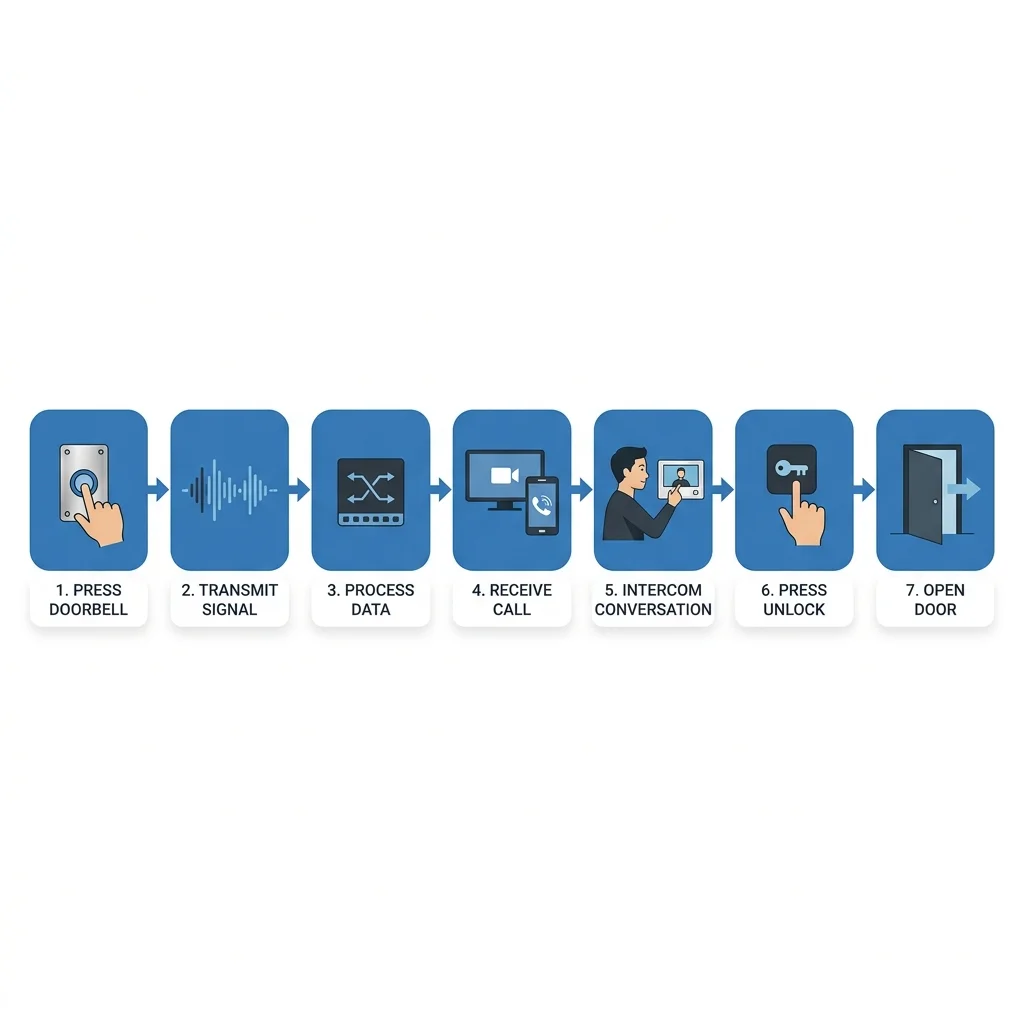
Signal Flow: What Happens When Someone Presses Your Doorbell
- Visitor presses the call button on the door station.
- Door station sends a call signal to all configured indoor monitors (or to the cloud server for mobile routing).
- Indoor monitor rings and displays video from the door station camera.
- Resident speaks with the visitor: full duplex audio, both can talk simultaneously.
- Resident presses the door release button: the monitor sends a signal to the door station's relay output.
- Relay closes for the configured duration (typically 3–5 seconds): the lock releases and the visitor enters.
- Event is logged: timestamp, snapshot, and audio recording stored in the system.
Wiring Standards
| System Type | Cable Used | Max Distance | Notes |
|---|---|---|---|
| Analogue 2-wire | Proprietary 2-core cable | ~100–150m | Simple, low cost: common in landed homes and small systems |
| Analogue 4-wire | 2 × 2-core shielded | ~200m | Separate audio and video runs: older residential systems |
| IP / Network | Cat 6 Ethernet | 100m per segment (extendable) | Standard for all new installations: carries audio, video, and power (PoE) |
| Wireless | Wi-Fi 2.4 / 5GHz | Depends on coverage | No cabling: faster installation, but reliability depends on Wi-Fi quality |
The component that property owners most often underestimate is the door release mechanism. Choosing the wrong lock type: particularly on a door that forms part of a fire escape route: can create a serious safety compliance problem after the system is already installed. The lock selection should be confirmed with your security integrator before any equipment is ordered, not after the door station is already on the wall.
4. Types of Intercom Systems
Intercom systems come in several different forms. Understanding the differences makes it much easier to select the right solution for your property: and avoid paying for capability you do not need, or specifying a system that cannot grow with your requirements.
By Communication Capability
| Type | What It Provides | Best For |
|---|---|---|
| Audio Only | Voice communication between visitor and resident: no video | Budget installations, internal staff communication, low-risk entrances |
| Audio + Video | Live HD video feed of visitor plus two-way audio: the standard for all new Singapore residential and commercial installations | All property types where visual visitor verification is required |
| One-Way (PA) | Announcements broadcast from one source to multiple receivers: listeners cannot reply | Factories, warehouses, school corridors, public address applications |
| Full Duplex | Both parties can speak and hear simultaneously: like a phone call | Professional installations, reception desks, all residential intercoms |
By Scale
| Scale | Typical Configuration | Example |
|---|---|---|
| Single-Unit | 1 door station + 1–2 indoor monitors | Landed home gate, single-office entrance |
| Multi-Unit | 1–4 door stations + multiple indoor monitors, networked | Large landed home, small office block, shophouse |
| Building-Wide | Lobby panel + per-unit monitors + guard house integration + management software | Condominiums, commercial buildings, hospitals |
By Installation Method
| Method | Description | Best For |
|---|---|---|
| Wired (Professional Standard) | Cat 6 or dedicated intercom cable between all stations. Maximum reliability, best audio and video quality. | New builds, major renovations, permanent installations |
| Wireless | Wi-Fi connected stations. No cable runs: fast installation, but reliability depends on Wi-Fi quality and distance. | Retrofit where cabling is impractical, temporary installations |
| Hybrid | Wired door station (critical reliability point) with wireless indoor monitors | Retrofit situations where some cabling is possible |
For any permanent installation, wired is always the right choice. Wireless intercoms are convenient for retrofits where running cable is genuinely impractical, but they introduce a dependency on Wi-Fi signal quality that a wired system simply does not have. In Singapore's densely built residential environment, Wi-Fi interference at gate positions: where the signal must pass through walls, fences, and landscaping: is a real and common problem. If there is any way to run a cable, run the cable.
5. Audio vs Video Intercoms: Which Should You Choose?
For most property owners, the real question is not whether to choose audio or video: it is whether the security benefit of seeing visitors before granting access justifies the modest additional cost. In our view, for almost all Singapore residential and commercial properties today, it does.
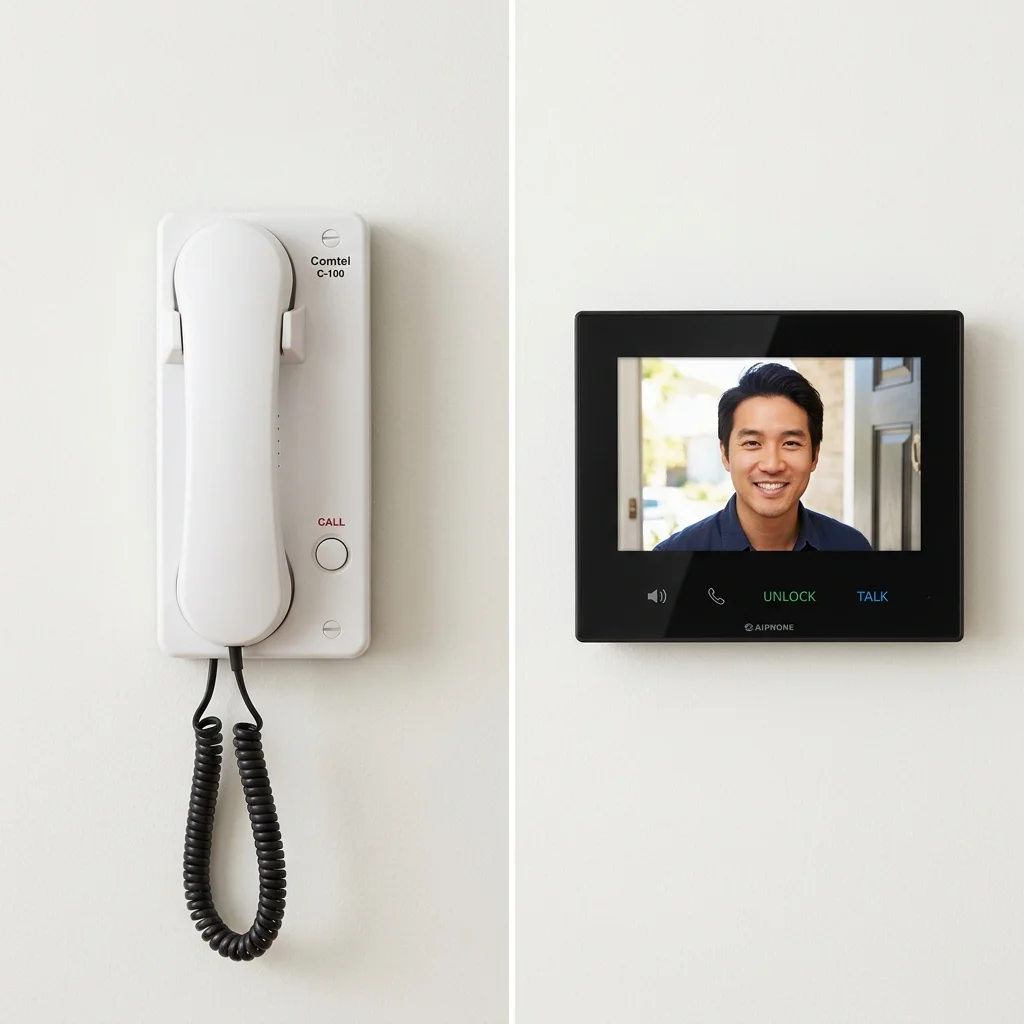
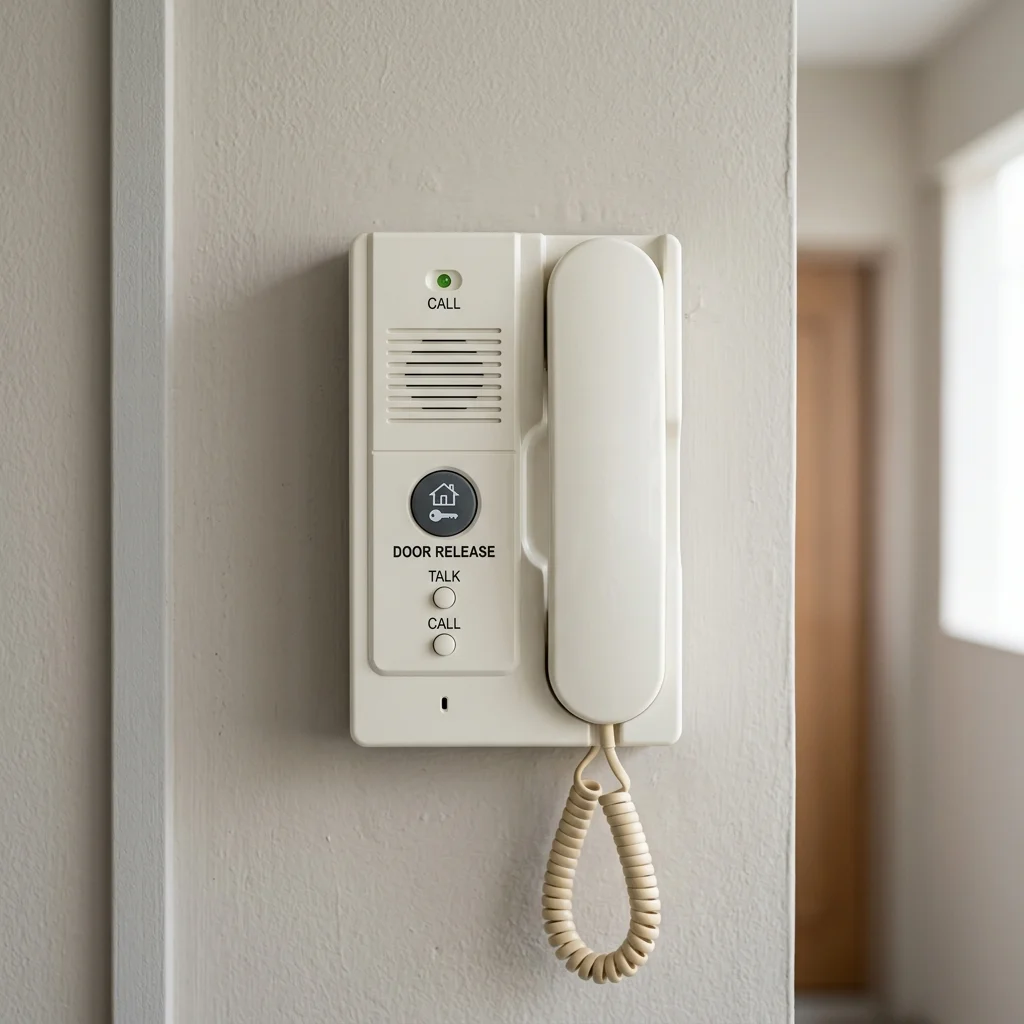
Audio handset (left): simple, private, long-proven reliability. Video monitor (right): visual verification of every visitor before granting access.
Audio-Only Intercoms
Communicate by voice alone. The visitor presses the call button, a bell rings on the indoor handset, and residents pick up to speak. Door release is triggered from the handset. Still widely used for internal staff communication between departments or floors where visual verification is not required.
Advantages: lower cost, simpler installation, longer proven reliability, and better privacy in open-plan interiors (handset conversations are not heard by nearby colleagues). Best for internal inter-department communication, secondary entrances, and budget-constrained installations.
Audio-Video Intercoms
The standard for all new Singapore residential and commercial installations. The indoor monitor displays live HD video from the door station camera when the visitor calls. Residents see who is at the door before speaking or releasing the lock. Modern systems record a snapshot or short video clip of every caller: providing an audit trail of all visitor interactions.
Camera specifications to look for: 2MP minimum resolution, 140° or wider angle lens, IR night vision for complete darkness capability, and IP65 weatherproofing for outdoor door stations in Singapore's climate.
For any new installation in Singapore: residential or commercial: specify audio-video as the minimum. The security benefit of visual visitor identification before door release is significant, and the price premium over audio-only is modest for entry-level systems. Audio-only is retained for internal staff communication stations where video adds no value.
User Experience Matters
When discussing intercom systems, buyers often focus on cameras, monitors and mobile app features. In practice, user experience is just as important as technical specification: and a system that is difficult to use quickly becomes a source of frustration that defeats its own purpose.
If residents struggle to answer calls, cannot hear visitors clearly, or find the mobile application confusing, they will naturally stop using the system as intended. The result is predictable: residents leave doors unlocked to avoid the intercom process, ask visitors to call them directly on their mobile phones, or simply ignore the intercom altogether when it rings. None of this is malicious: it is a normal human response to a system that gets in the way rather than helps.
A good intercom system should feel natural and intuitive. Visitors should know what to do when they arrive at the entrance. Residents should know how to respond when a call comes through. The technology should support the interaction, not become the interaction.
The best intercom systems are often the ones that people barely think about: because they simply work every day without requiring effort or training.
Before finalising any intercom specification, we ask a simple question: will the residents or staff who use this system every day actually use it as intended? If the honest answer is uncertain, the system is probably wrong for the application: regardless of how well it performed in a demonstration or how impressive the specification sheet looks.
6. Traditional Analogue vs IP Network Intercoms
One of the first decisions when selecting an intercom system is whether to use a traditional analogue system or a modern IP-based system. Both can handle the basic task of visitor communication: the difference lies in flexibility, future capability, and how the system grows with the property.
Most property owners do not choose an IP intercom because it uses Cat 6 cable. They choose it because they want mobile app answering, remote door release, visitor snapshots, and easier expansion in the future. The network architecture simply makes those capabilities possible: and in buildings where Cat 6 is already installed for CCTV or Wi-Fi, adding an IP intercom often requires very little additional infrastructure.
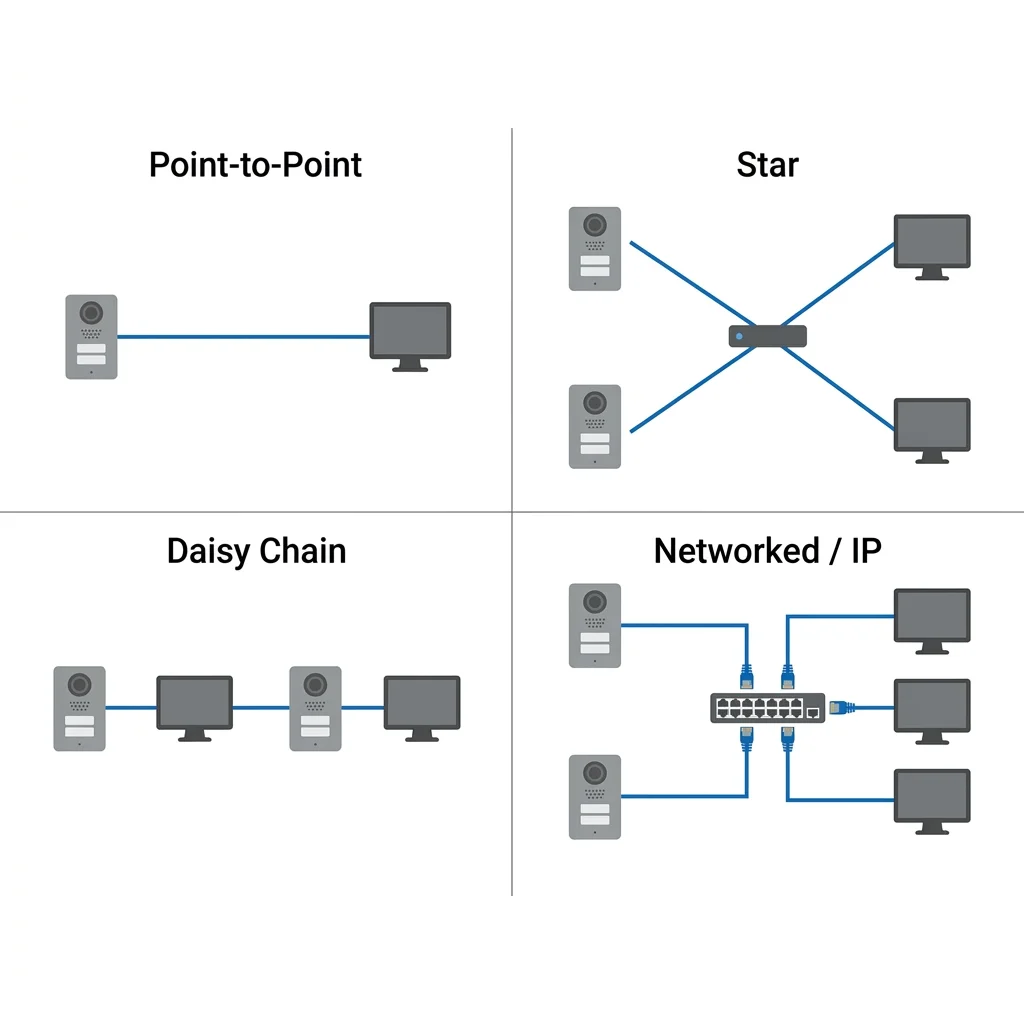
Analogue systems use dedicated wiring in a star topology: each station runs directly back to a central unit. IP systems share the Cat 6 network infrastructure already present in the building.
Analogue Intercom Technology
Analogue intercoms use dedicated wiring between each station. The technology has been used successfully for decades and is simple, reliable, and proven. For smaller properties with a single entrance and a limited number of indoor monitors, an analogue system can still perform very well. The limitation is that adding new stations, connecting to mobile apps, or integrating with other security systems can become difficult and may require additional cabling or a complete change of equipment.
Best suited for: small residential installations with one door station and two to four indoor monitors, properties with existing analogue wiring in good condition, and situations where simplicity is more important than future flexibility.
IP Network Intercom Technology
IP intercoms use the same network cabling (Cat5e or Cat6) commonly found in modern buildings: the same infrastructure used by computers, CCTV cameras, and Wi-Fi access points. Each station connects to the building's network switch, which supplies both data and power through a single cable. Adding a new station is as straightforward as connecting it to any available network port. Integration with CCTV, access control, and building management systems is built in rather than bolted on.
| Feature | Analogue | IP Network |
|---|---|---|
| Cabling | Dedicated proprietary cable per station | Standard Cat 6 shared network |
| Video quality | Up to 720p (older systems much lower) | HD 1080p to 4K standard |
| Scalability | Limited by control unit capacity | Add stations to any network port |
| Mobile app | Not available | Standard feature on all major brands |
| Recording | Limited or none | Built-in: cloud or local storage |
| Integration | Minimal: relay output only | Full API and protocol integration |
| Installation cost | Lower for small systems | Lower for large or multi-site systems |
| Long-term upgrade path | Often requires full replacement | Software updates, hardware modularity |
If you have an existing analogue system and want to upgrade without replacing all cabling, some IP intercom brands offer analogue-to-IP adapters that allow existing 2-wire or 4-wire cable runs to carry IP signals to new door stations and indoor monitors. This is not ideal but can be cost-effective for condominiums with existing infrastructure embedded in walls.
7. Cloud-Based Intercom Systems
One of the biggest changes in intercom technology over the past decade has been the move towards cloud-based systems. Traditionally, visitor calls could only be answered from an indoor monitor installed inside the property. Cloud technology changes this completely: today, visitor calls can be sent directly to a smartphone, allowing residents or staff to respond from anywhere.
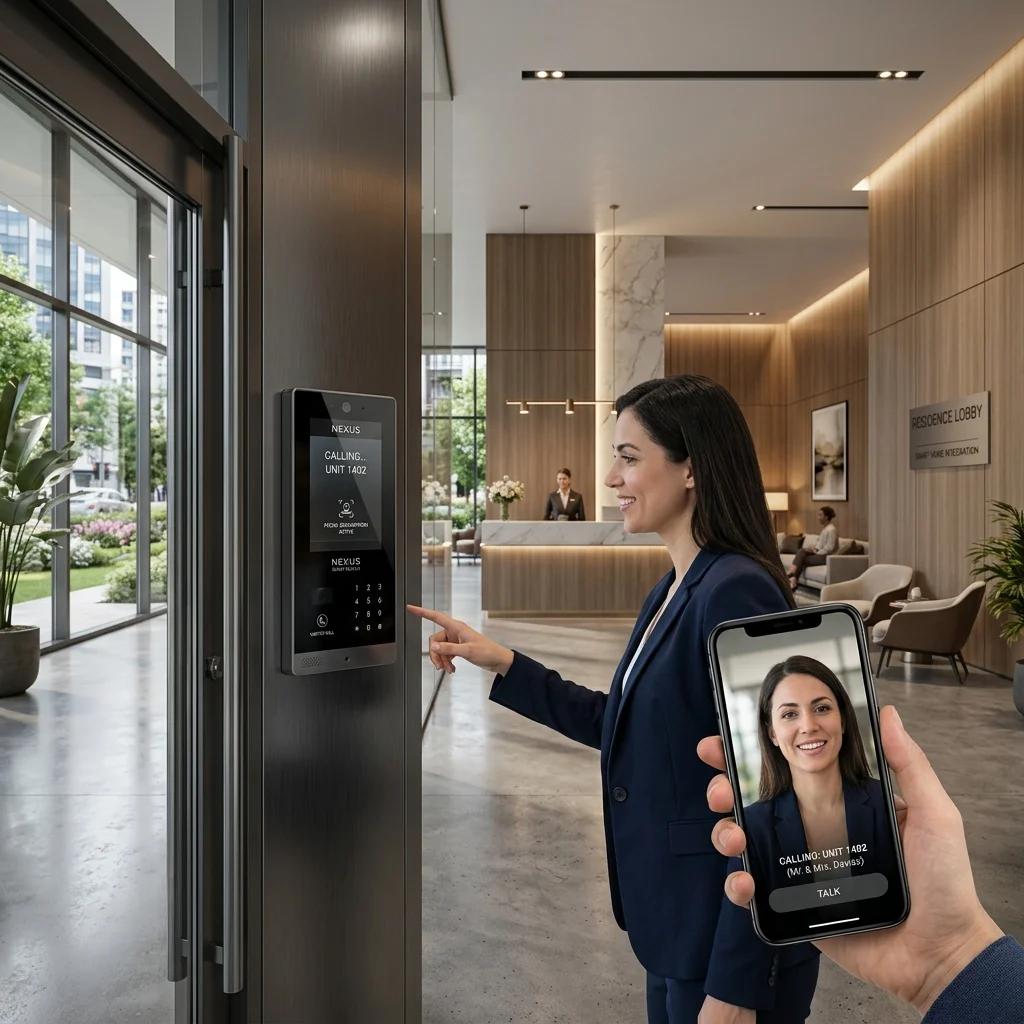
Cloud intercoms route door calls to your smartphone: see live video, speak with the visitor, and release the door from anywhere in the world.
When a visitor presses the call button at a cloud-connected door station, the call is routed over the internet to the resident's or staff member's smartphone. They can see live video of the visitor, speak with them through the app, and press unlock to release the door: whether they are in the next room or overseas. To the visitor, the experience is no different from a traditional intercom.
Akuvox SmartPlus: Singapore Market Standard
Akuvox's SmartPlus cloud platform is the most widely deployed cloud intercom solution in Singapore's residential and small commercial market. Key features include mobile app door answering on iOS and Android, time-limited QR code generation for visitor access, call history with snapshots stored in the cloud, and integration with Akuvox's access control readers. Hardware ranges from compact single-button door stations to multi-tenant lobby panels with touchscreen directories.
Cloud Convenience and Cloud Dependency
Cloud technology brings genuine benefits: residents can answer calls from anywhere, grant access remotely and manage visitors through a mobile application. But cloud functionality also introduces dependency on internet connectivity, the availability of the cloud platform, continued mobile application support, and vendor software updates. This does not mean cloud systems should be avoided: far from it. Most modern residential and commercial projects benefit significantly from cloud functionality. The important point is to understand the trade-off. Whenever possible, we recommend systems that continue to operate locally even when internet connectivity is unavailable, so residents still have access to core intercom functions at all times.
Is Cloud Right for You?
| Factor | Cloud Advantage | On-Premise Advantage |
|---|---|---|
| Remote access | Answer door calls from anywhere in the world | Works on local network without internet |
| Infrastructure | No server required: cloud hosted | Data stays on-site: no subscription dependency |
| Power failure | System goes offline without internet and power | Local system may work with UPS backup |
| Data privacy | Visitor data stored on cloud servers | Visitor data stays within your building |
| Maintenance | Automatic firmware updates, no IT management | Manual updates, requires IT oversight |
| Best for | Residential, SME, frequent travellers, multi-site | Enterprise, government, data-sensitive environments |
What Happens If the Internet Goes Down?
This is one of the most common concerns about cloud-based intercom systems, and it is a fair one. The good news is that most modern IP intercom systems continue to operate locally within the building even without internet connectivity. Residents can still communicate with visitors through indoor monitors, and doors can still be released through the local network.
What is affected during an internet outage are the cloud-based services: mobile app notifications, remote door release from smartphones, and cloud management portals. These resume automatically once internet connectivity is restored. For most Singapore residential and commercial properties, local operation during an internet outage is perfectly adequate: the system continues to work, just without remote smartphone access.
What Happens During a Power Failure?
Intercom systems require power to operate. Without backup power, door stations, indoor monitors, network switches, and controllers will stop functioning during an outage. For critical applications: hospitals, care facilities, commercial buildings with 24-hour access requirements: an Uninterruptible Power Supply (UPS) protecting the network switch and intercom controller is essential. Securevision recommends a minimum two-hour battery backup for all critical security infrastructure, including intercoms.
It is also important to note how different lock types behave during a power failure. Electromagnetic locks (EM locks) are fail-safe: they unlock automatically when power is lost, which is the correct behaviour for doors on fire escape routes. Fail-secure locks remain locked during a power failure and are only appropriate for doors where continued security is required even during an outage. This distinction matters significantly for compliance with Singapore's fire safety requirements.
For most new residential and small commercial projects in Singapore today, we recommend a cloud-based IP intercom that also supports local indoor monitors. This gives residents the flexibility to choose: some prefer answering on a dedicated monitor, others prefer their smartphone. A good system supports both without compromising on either. The question is not whether cloud technology works. It works well. The question is whether your property's internet connection is reliable enough for the cloud functions to be the primary access method.
8. Door Release Mechanisms
An intercom system controls access but does not physically open the door itself. It sends a signal to a separate locking device, which then releases. Choosing the right lock for each door is as important as choosing the right intercom: and the consequences of getting it wrong, particularly on fire exit doors, can be serious.
An electric strike replaces the standard strike plate: concealed in the frame, compatible with existing door hardware, available in fail-safe and fail-secure versions.
A relay is an electrically operated switch inside the door station. When you press "door release" on your intercom monitor, the monitor sends a signal to the door station's relay. The relay closes, completing a circuit to the lock mechanism, which releases. The relay then opens again after a configurable duration: typically 3–10 seconds.
Lock Types Compatible with Intercom Systems
| Lock Type | How It Works | Fail Mode | Best For |
|---|---|---|---|
| Electromagnetic (EM) Lock | Powerful magnet holds door closed. Releases when power is removed. | Fail-safe: unlocks on power cut | Glass doors, fire exits, most commercial entrances |
| Electric Strike | Replaces strike plate: solenoid releases latch on signal | Available fail-safe or fail-secure | Timber doors, existing frames, concealed installation |
| Drop Bolt | Motor-driven vertical bolt into floor strike | Fail-safe or fail-secure | Double doors, narrow aluminium frames, no centre post |
| Electric Deadbolt | Motor-driven bolt provides 25mm throw into frame | Fail-secure (bolt remains extended) | High-security internal doors, server rooms |
| Gate Motor Trigger | Relay closes across motor control board "open" input | Motor dependent | Swing gates, sliding gates, car park barriers |
All doors in a Means of Escape must use fail-safe locks. Upon fire alarm activation or power failure, these locks must release immediately to allow unimpeded evacuation. Fail-secure locks are prohibited on fire exit doors unless a manual mechanical override is provided. This is a hardwired requirement: the intercom relay must be integrated with the Fire Alarm Panel via dry-contact relay to ensure automatic release on alarm.
Lock selection is one of the most frequently overlooked parts of an intercom specification. In our experience, the most common post-installation problem we are called in to fix is a lock that does not match the door type, the fire safety requirement, or the access control system it is connected to. These problems are entirely avoidable with a fifteen-minute conversation at the planning stage. Always confirm lock type, fail mode, and fire safety compliance before equipment is ordered.
9. Intercom Systems for Residential Properties
For homeowners, an intercom system provides both security and convenience. Rather than opening the door to every visitor, residents can first verify who is outside before granting access: and with a modern IP system, they can do this from anywhere using their smartphone.
A complete residential IP intercom: video door station at the gate, indoor monitor in the living room, and mobile app for answering calls when away from home.
Choosing the Right Residential System
The right configuration depends on the property type, the number of entry points, and whether cabling infrastructure is already in place. The table below reflects what we typically recommend for each residential scenario in Singapore.
| Property Type | Recommended Configuration | Key Considerations |
|---|---|---|
| Terrace / Semi-D (standard) | 1 door station at gate + 1–2 indoor monitors + mobile app | Cat 6 cable from gate to house: plan conduit route during renovation |
| Detached Bungalow | 2 door stations (main gate + side) + 3–4 indoor monitors + mobile app | Consider guard post integration if property has live-in security |
| GCB / Large Estate | Multiple door stations + guard post master station + building-wide IP network | Requires structured cabling plan: integrate with CCTV and alarm |
| Completed renovation (no cabling) | Wi-Fi door station + existing Wi-Fi network + mobile app only | Wireless reliability depends on Wi-Fi coverage at gate: test before committing |
Indoor Monitor Placement
The key principle for indoor monitor placement is proximity to where residents spend most of their time. Standard practice for Singapore landed homes: one monitor in the kitchen or living room (ground floor, near the main living area), one in the master bedroom (for night-time visitor management), and the mobile app as a backup for when residents are away from both locations. Avoid placing monitors in rooms with high ambient noise: they will be difficult to hear when a visitor calls.
Single-Door vs Multi-Door Residential Systems
A single-door system with one door station and one indoor monitor is adequate for most Singapore terrace houses with a single gate. If your property has both a main gate and a side gate, or a pedestrian gate separate from the vehicle gate, a two-station system with separate call buttons and the ability to identify which entrance was pressed is the correct specification. On an IP system, each station has its own camera feed and the indoor monitor shows which station is calling.
10. Condominium & Apartment Intercom Systems
Intercom systems play a much larger role in condominiums than in individual homes. In addition to visitor communication, they often form part of the overall access management strategy for the development: managing residents, visitors, delivery personnel, and service providers across multiple entrances simultaneously. For lift integration and access control integration specifics, see Section 12.
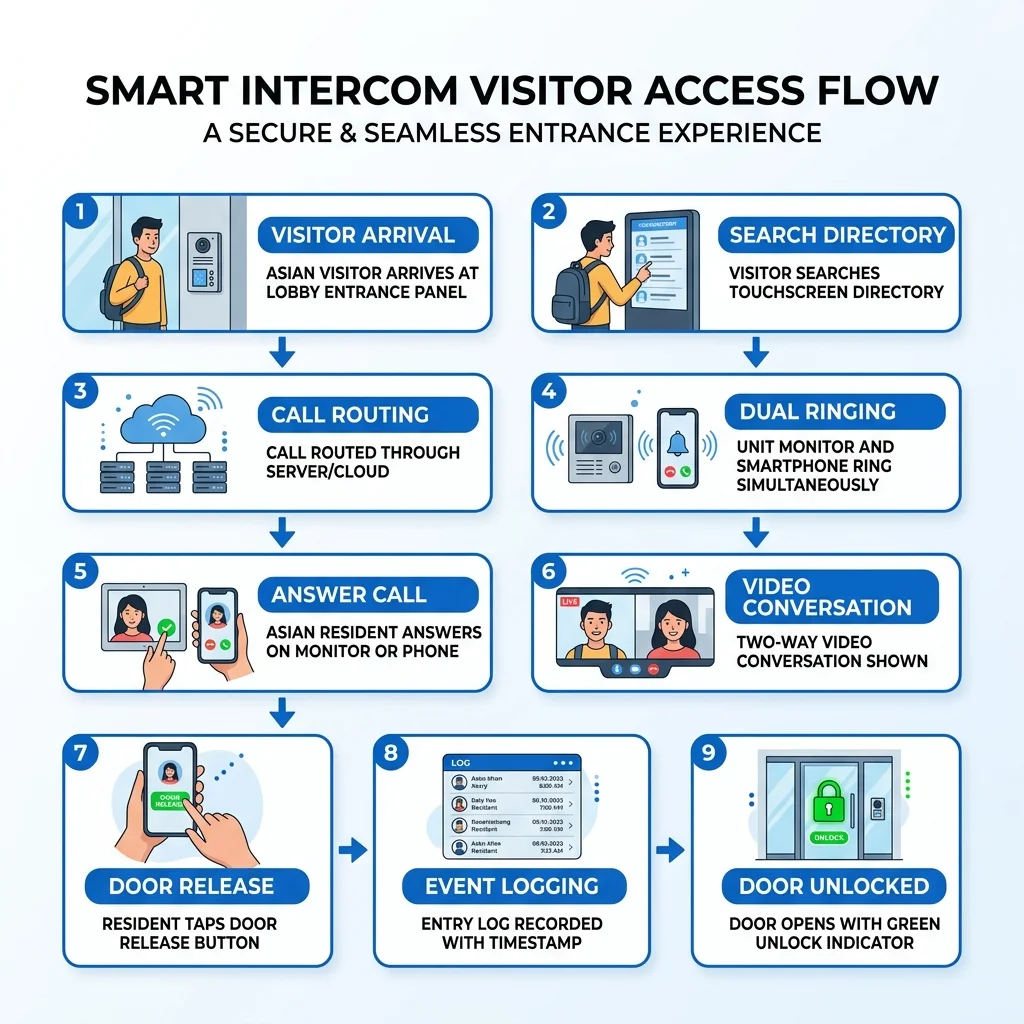
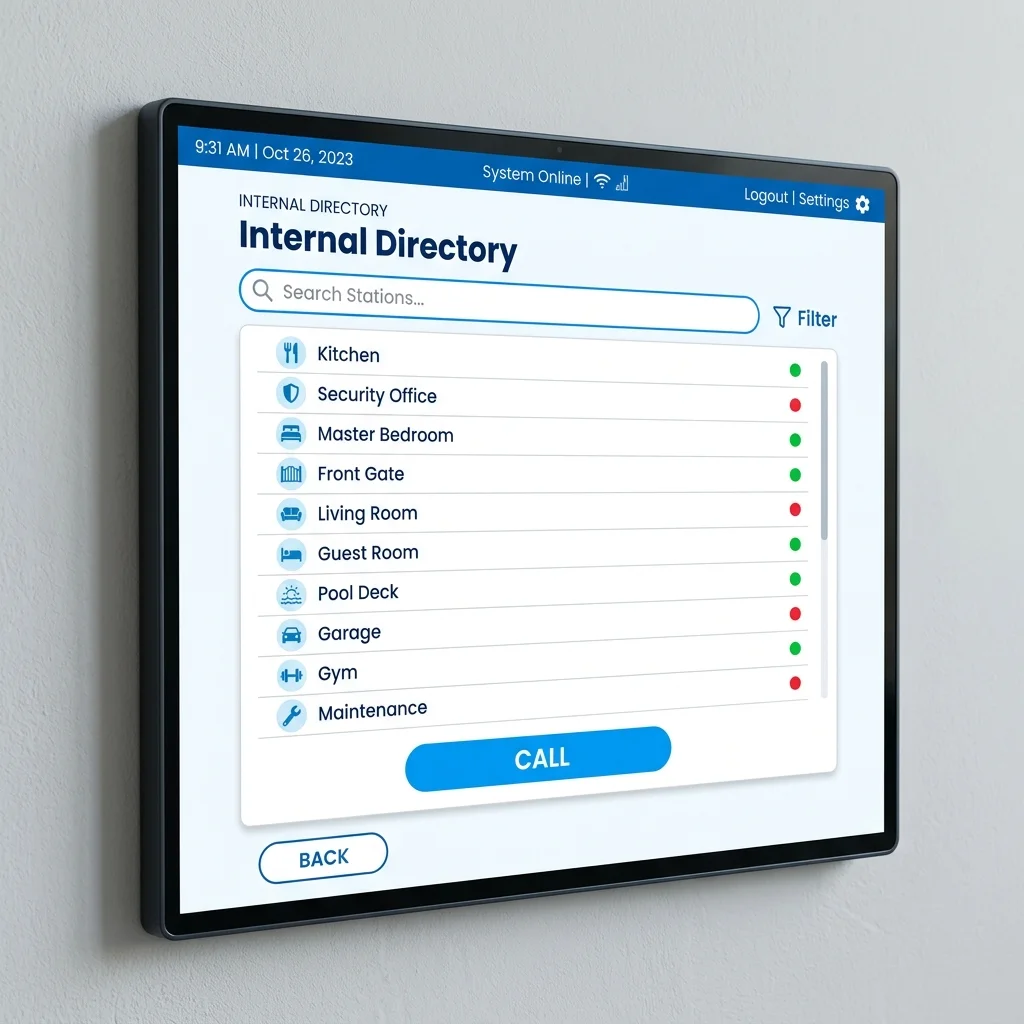
A condo lobby panel: visitors search for the unit number or resident name on a touchscreen directory, the system routes the call to that unit's indoor monitor or mobile app.
How Condo Intercom Architecture Works
A visitor arrives at the main lobby entrance and interacts with the lobby panel: a large touchscreen or keypad unit with a camera. They search for the resident's unit number or name on the directory. The system routes a video call to that unit's indoor monitor and to the resident's mobile app. The resident sees the visitor, speaks with them, and presses unlock to release the lobby door. The call is logged with a timestamp and snapshot.
Behind the scenes, the lobby panel connects to a building server (on-premise or cloud) that stores the unit directory, manages call routing, and handles access permissions. Each unit has its own indoor monitor or SIP phone extension. Large condominiums may have multiple lobby panels at different entrances, a guard post master station, and vehicle barrier integration at the car park.
Condo Intercom Upgrade: Planning Considerations
Upgrading a condo intercom system is a major project requiring MCST approval and careful planning because it affects every unit simultaneously. Key considerations:
- Existing infrastructure: Can the new system reuse existing riser cabling, or does new Cat 6 need to be pulled through conduit from the comms room to each floor?
- Per-unit disruption: Will new indoor monitors require entry into every unit for installation? This requires coordinating with all residents.
- Phased migration: Some systems allow running new and old infrastructure in parallel during transition so residents are never without intercom service.
- Mobile app as primary: Cloud-based systems eliminate the need for new indoor monitors: residents answer calls on their smartphones. This dramatically reduces per-unit installation scope and cost.
| Approach | Cost per Unit | Disruption | Outcome |
|---|---|---|---|
| Full replacement (new monitors + lobby) | S$1,200 – S$2,200 | High: entry to every unit | Full upgrade with HD video monitors in each unit |
| Mobile-first (cloud, no new monitors) | S$400 – S$800 | Low: no unit entry needed | Residents answer on smartphones; existing monitors may be retained |
| Lobby only (new panel, existing monitors) | S$200 – S$500 | Minimal | Improved lobby experience; indoor monitors unchanged |
Resident Communication Is Often the Hardest Part
From a technical perspective, replacing a condominium intercom system is usually straightforward. Managing resident expectations during the project is often much harder.
Residents may not read notices sent through the management office. Some miss emails. Others are simply not aware that anything is changing until installation begins and the system they have been using for ten years is suddenly different. Even when multiple notices have been issued through every available channel, there will almost always be residents who only become aware of the project at the last moment: and whose first interaction with the new system is one of confusion rather than welcome.
For this reason, communication planning is just as important as technical planning in any condominium intercom upgrade. Successful projects typically involve advance notices issued well before works begin, a resident briefing or demonstration session where the new system is explained in person, a frequently asked questions document distributed to all units, and a support channel: whether a dedicated phone number, email, or WhatsApp group: that residents can use during the migration period when questions inevitably arise.
The technology is only part of the project. The people affected by the technology are equally important: and in our experience, the projects that run smoothest are the ones where the MCST and managing agent invest as much effort in the communication plan as in the technical specification.
11. Office & Commercial Intercom Systems
Commercial and industrial properties often have different requirements from residential developments. Visitor access must be managed efficiently while maintaining security and operational control: and in many offices, the intercom system also handles internal communication between departments and floors.
A reception intercom integrates visitor management with internal communication: the receptionist sees and speaks with visitors on the same system used for inter-department calls.
Visitor Management at Entry Points
Commercial properties typically use IP video door stations at entrances connected to the reception desk. The receptionist's monitor shows live video of the visitor. They speak with the visitor, verify identity, and release the entrance door or alert the employee the visitor is there to meet. For unmanned or after-hours entry, a cloud-connected door station routes calls to employees' mobile phones: no physical reception presence required.
For offices with high visitor volumes, a self-service visitor kiosk can pre-register guests with QR code credentials sent by email. The guest scans the QR at the entrance door station and enters without calling the reception: the system logs the entry and notifies the host automatically.
Internal Staff Communication
Many Singapore offices use intercom networks for internal communication between departments, meeting rooms, or floors: similar to an extension telephone system but dedicated to building communication. IP intercom systems support internal calling directories where staff press a button or enter an extension number to call another station directly. This is distinct from external telephone capability (which requires a PABX and SIP trunk).
Retail and Commercial Specialised Applications
| Application | System Requirement |
|---|---|
| Retail boutique after-hours | Single video door station + mobile app routing: staff let in authorised couriers or cleaners remotely |
| Bank branch | Airlock mantrap intercom: visitor calls from outer door, security verifies and releases inner door |
| Medical clinic | Reception intercom + patient call stations in consultation rooms: nurse can communicate without entering |
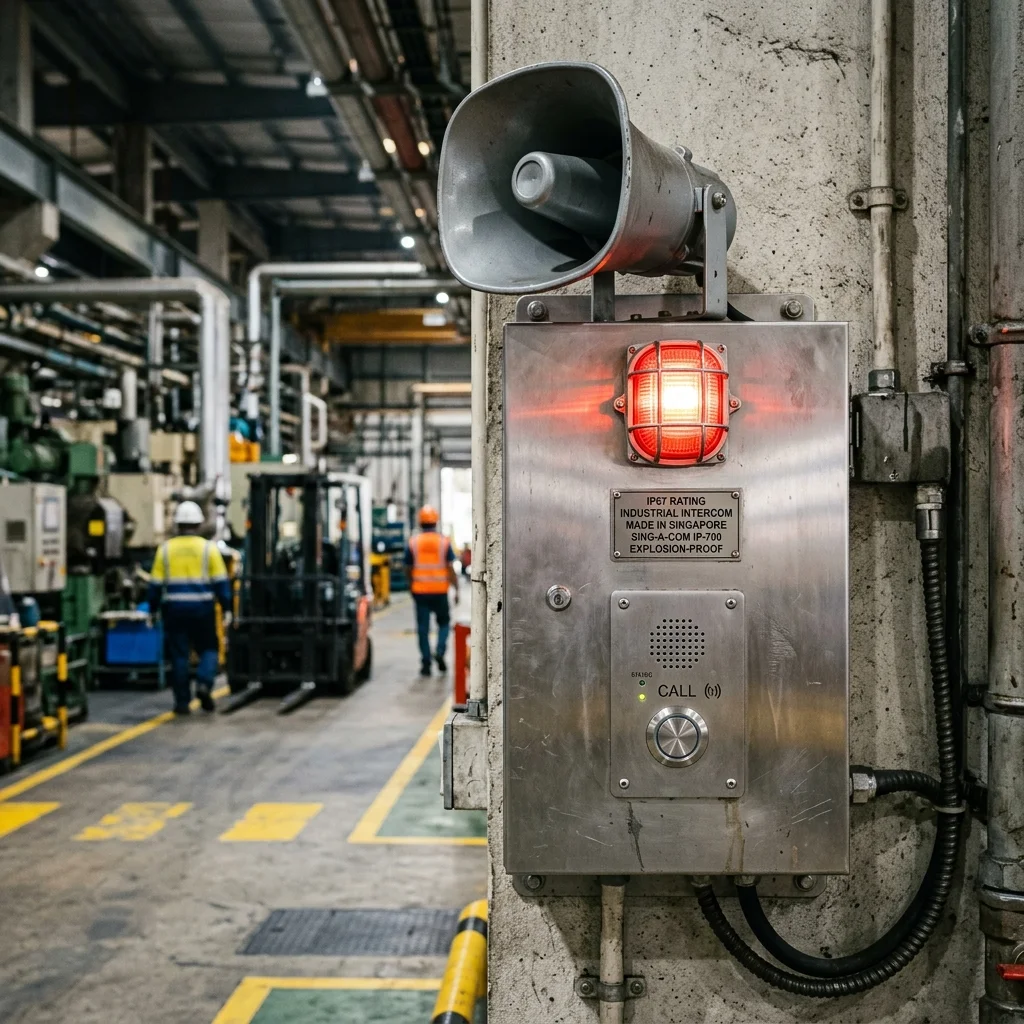
| Industrial loading bay | IP67 ruggedised door station with high-power speaker and noise-cancelling microphone: audible in noisy environments |
| Emergency stations | Lift intercom, handicap toilet call button, car park help point: one-way call to security control room |
12. Integration with Other Security Systems
An intercom system should not be viewed as a standalone product. In most modern buildings, it forms part of a larger security solution that includes access control, CCTV, and sometimes building management systems. When properly integrated, these systems work together to improve security, convenience, and operational efficiency: in ways that none of them could achieve on their own.
A unified security platform: intercom calls, CCTV feeds, and access events all visible in a single management interface, correlated by time and location.
Intercom + Access Control Integration
The most common integration in Singapore commercial and residential properties. The door station serves two roles simultaneously: as a visitor intercom (unknown guests press the call button), and as an access reader (authorised users tap a card, enter a PIN, or present a fingerprint). A single door station handles both functions. The access control controller behind the scenes manages credential validation, time restrictions, and audit logging: while the intercom manages visitor calls.
More sophisticated integration allows the access control system to display the intercom snapshot against the access event: if someone tailgates an authorised user, the camera captures both faces and the audit trail shows a discrepancy between the credential used and the number of people who entered.
Intercom + CCTV Integration
When a visitor presses the call button, the CCTV management system can be triggered to pop up the camera covering that entrance on the security desk monitor. This supplements the door station's own camera with a wider field of view, and allows security staff to observe the surrounding area: not just the visitor's face: before releasing the door.
Visitor Management System (VMS) Integration
Pre-register visitors and issue time-limited QR code credentials sent by email. The visitor arrives, scans the QR code at the door station, and enters without calling anyone: the system logs the entry with a timestamp and notifies the host. The QR code expires automatically at the end of the meeting, and the visitor cannot re-use it. Full audit trail of every visitor interaction is maintained.
Network Security for IP Intercoms
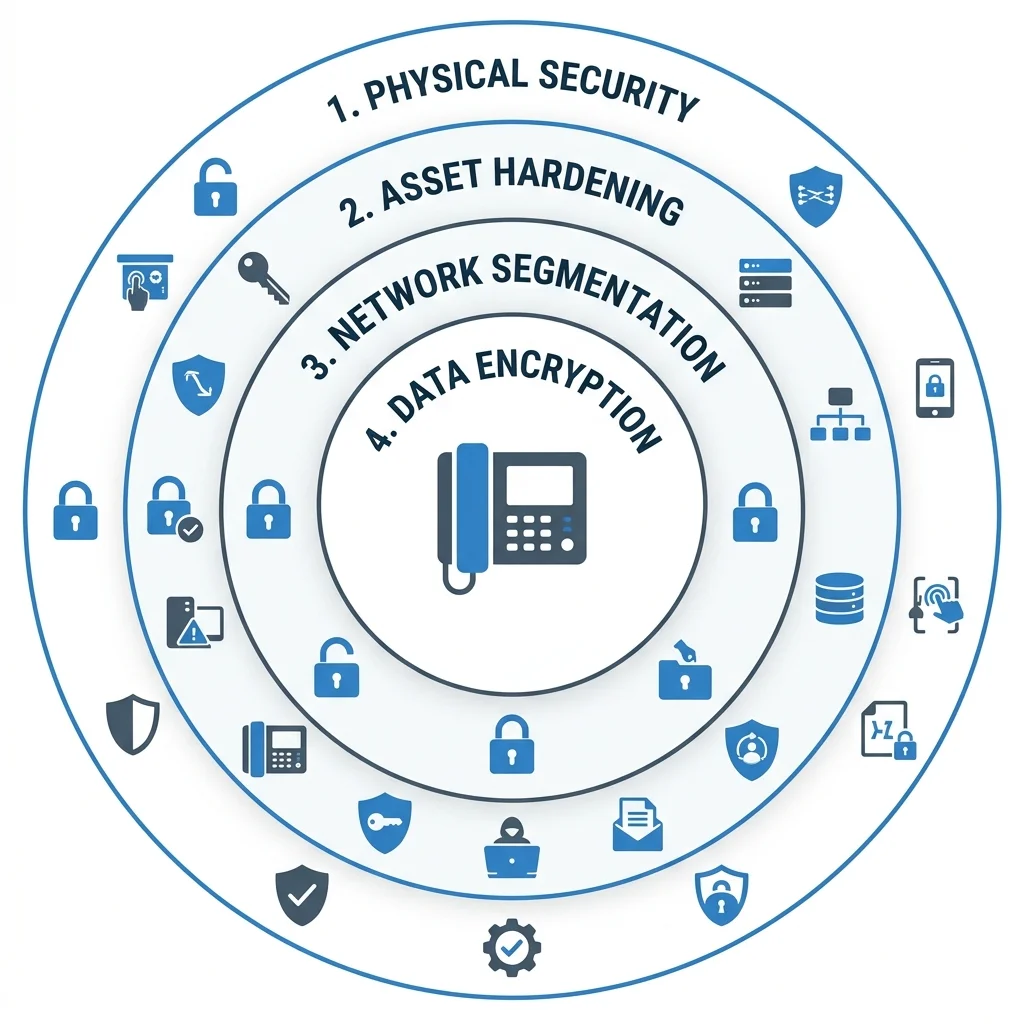
Because IP intercoms are network-connected devices, they need to be treated as part of the building's overall security infrastructure: not just as door equipment. The basics are straightforward: change the default passwords during commissioning, keep firmware updated, and where possible place intercom devices on a separate network segment from the general office or home network. A more detailed discussion of cybersecurity for IP intercoms is in Section 16.
13. Planning Your Intercom System
Choosing an intercom system is not simply about selecting a brand or model. The best system depends on the type of property, how visitors are managed on a daily basis, and what the property may need five or ten years from now. A little planning at the beginning prevents costly changes later: and in our experience, the most expensive intercom problems always trace back to decisions made before any equipment was specified.
Needs Assessment Framework
| Question | Why It Matters |
|---|---|
| How many entry points need to be controlled? | Determines number of door stations and complexity of call routing |
| How many indoor stations or units need to receive calls? | Determines system scale: single unit, multi-unit, or building-wide |
| Do residents or staff need to answer calls on their mobile phones? | If yes, IP or cloud system is required: analogue cannot support mobile app |
| Is there existing cabling infrastructure? | Determines whether new Cat 6 runs are needed or existing cable can be reused |
| Is access control integration required at the same door? | If yes, specify a door station with built-in card reader / biometric credential support |
| What is the fire safety classification of the door? | Determines lock type: fire exit doors require fail-safe EM locks, not fail-secure |
| Is this a new install or retrofit? | Retrofit into completed walls significantly increases labour cost: wireless may be more practical |
Site Survey Requirements
A proper site survey before specifying an intercom system should cover: measurement of cable run distances from each entry point to the comms room, identification of conduit routes or wall-chasing paths, confirmation of door material and frame condition for lock selection, power supply availability at each door station location (or PoE from the network switch), and assessment of ambient noise levels (high-noise environments like car parks require outdoor speakers with higher SPL ratings).
Common Reasons Intercom Projects Fail
Most intercom problems we are called to resolve were not caused by faulty hardware. They were caused by decisions made during planning: or by the absence of planning altogether.
Poor cable planning is the most common. Cable routes were not considered during renovation, resulting in visible surface trunking, additional cost, or compromised reader and station placement. The cable that should have been run inside the wall during construction becomes the most expensive cable in the project when it has to be threaded through a completed one.
Wrong door station location is the second most common. The station is installed where visitors stand directly into the afternoon sun, making identification by the resident nearly impossible. Or the location exposes the equipment to driving rain from the west, shortening its service life significantly. Station positioning should always be assessed on site at the time of day when the entrance is busiest.
Incorrect lock selection causes a different category of problem: the lock does not suit the door construction, the usage volume, or the fire safety classification of the door. This results in either reliability failures within the first year or expensive rework when the fire authority's inspection raises concerns.
And perhaps the most common of all: no visitor workflow. The equipment was specified and installed before anyone properly understood how visitors, contractors, delivery drivers and service providers actually arrive and move through the property each day. A good intercom project begins with people and processes. The technology selection follows from that understanding.
Retrofit vs New Installation
| Factor | New Installation | Retrofit |
|---|---|---|
| Cabling | Run during construction: low labour cost, clean result | Wall-chasing or surface trunking: higher labour, visible if surface-run |
| Flexibility | Optimal cable routes, concealed in walls | Constrained by existing structure |
| Cost | Lower overall: cabling labour shared with other trades | Higher: dedicated cable runs through completed walls |
| Wireless alternative | Not applicable: wired always preferred in new build | Wireless may be more practical than disruptive wall-chasing |
14. Brands, Investment Guide & What to Expect
Singapore's intercom market offers a wide range of options, from simple residential systems to enterprise-grade platforms designed for large developments. Rather than focusing only on brand names, it is more useful to understand which type of solution best fits your property: and what level of long-term support and expandability you will need.
Many buyers begin by asking which brand is best. In practice, the better question is whether the proposed solution fits the property, whether it can be properly supported over the long term, and whether the platform will still be receiving updates in five years. The best brand on paper is not always the best choice for every project.
When comparing intercom systems, it is easy to focus on the hardware: larger screens, sharper cameras, more impressive specifications. Yet most long-term satisfaction comes from factors that do not appear on a specification sheet. Is the system easy for residents and visitors to use day to day? Is support available locally when something goes wrong? Will spare parts still be available five years from now? Can the system expand if requirements change? Does the platform continue to receive firmware and software updates? A slightly less impressive specification supported by a stable ecosystem and responsive local support is often a better long-term investment than a system with impressive features but uncertain future support.
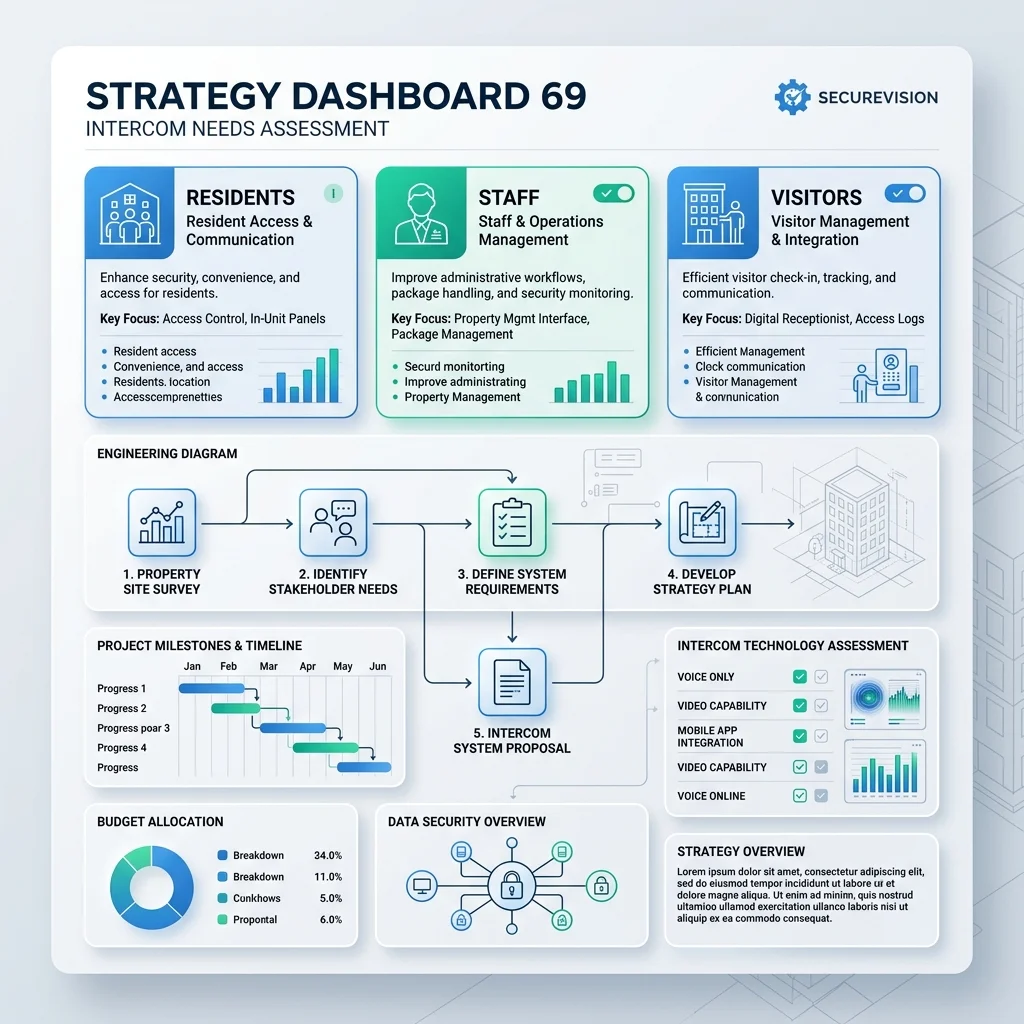
Singapore's intercom market has three distinct tiers: premium brands with proprietary platforms, mid-range open-standard IP systems, and budget hardware for basic applications.
Singapore Market: Brand Tiers
Singapore's intercom market broadly divides into three tiers. Understanding which tier fits your project: rather than defaulting to the most familiar brand name: usually leads to a better long-term outcome.
| Tier | Brands | Best For | Notes |
|---|---|---|---|
| Tier 1: Enterprise & High-Specification | Aiphone, Comelit, 2N, Akuvox (flagship) | High-end residential, commercial, condominiums requiring long-term support | Proprietary or open SIP platforms, 10+ year hardware longevity, strong Singapore distributor support |
| Tier 2: Mainstream IP | Akuvox (standard), Hikvision DS-KH series | Most Singapore residential and SME commercial projects | Open SIP, cloud capable, excellent value: the most common choice for new installations |
| Tier 3: Budget | Generic brands from e-commerce | Low-risk secondary entrances, temporary installations | Shorter firmware support cycles, limited integration capability, not recommended for primary security entrances |
Investment Guide: 2026 Singapore Benchmarks
| Scope | Typical Configuration | Budget Range (SGD) |
|---|---|---|
| Residential (basic) | 1 door station + 1 indoor monitor, analogue or entry IP | S$900 – S$1,800 complete |
| Residential (IP with mobile) | 1–2 door stations + 2–3 monitors + mobile app | S$1,800 – S$4,500 complete |
| Small office | 1–2 door stations + reception monitor + mobile app + access integration | S$4,000 – S$8,500 complete |
| Condominium (per unit) | Lobby panel + per-unit indoor monitor + guard house integration | S$1,200 – S$2,200 per unit (base + infrastructure) |
| Commercial building | Multiple door stations + guard house master + building server + access integration | Project-specific: from S$15,000 |
Securevision follows the Singapore standard of 30% deposit on order confirmation, 40% on hardware delivery to site, 20% on commissioning and handover, and 10% retention upon final sign-off. Any contractor requesting full payment upfront should be treated with caution.
Power Requirements & Backup
IP intercom systems are PoE-powered: the network switch supplies power over the Cat 6 cable. This simplifies installation but means the intercom goes offline if the switch loses power. For properties where uninterrupted operation during power outages is essential (hospitals, care homes, commercial buildings with 24/7 access), a UPS protecting the PoE switch is required. Securevision recommends a minimum 2-hour battery backup for all critical security infrastructure including intercoms.
15. Maintenance and Common Mistakes
Like any security system, an intercom performs best when it is properly maintained. Singapore's tropical climate: high humidity, intense heat, and frequent rain: accelerates wear on outdoor components more quickly than in temperate climates. Regular maintenance extends equipment life and prevents the kind of gradual deterioration that is only noticed when something stops working at an inconvenient moment.
Preventive Maintenance Schedule
| Frequency | Task |
|---|---|
| Monthly | Remote log review: check for failed calls, door release errors, or offline devices. Firmware version check on all stations. |
| Quarterly | Physical cleaning of door station lens (dust and insect debris accumulates on outdoor units in Singapore). Check door station seals for moisture ingress. Test door release function on all locks. |
| Annually | Full structural audit: cable stress test, connection tightening, EM lock gap check (magnet and armature plate alignment degrades over time), UPS battery load test. |
Common Faults and Troubleshooting
| Symptom | Most Likely Cause | First Check |
|---|---|---|
| No audio or video from door station | PoE switch not supplying power, or Cat 6 cable fault | Check PoE switch port status. Test cable continuity with tester. |
| Distorted or foggy image | Lens moisture, dust, or salt residue from outdoor exposure | Clean lens with lens cloth. Check outdoor seal integrity. |
| Door not releasing when button pressed | Relay wiring fault, incorrect relay configuration, or lock misalignment | Test relay output voltage with multimeter. Check EM lock gap. |
| Background noise or echo | Cable interference, loose grounding, or incorrect audio gain settings | Check cable shielding and grounding. Adjust gain in admin software. |
| Mobile app not receiving calls | Push notification service blocked, internet connectivity, or app background restriction | Check app notification permissions. Test internet connectivity at door station. |
Common Installation Mistakes to Avoid
- Under-specifying weatherproofing: Using indoor-rated door stations or readers outdoors. Singapore's climate will destroy non-rated hardware within months. Always specify IP65 minimum for outdoor locations.
- No drip loop on outdoor cables: Rain travels along the cable into the device electronics. Always form a downward drip loop before the cable enters the door station body.
- Mounting door station in direct sunlight: Facial recognition cameras are significantly degraded by strong backlighting. Position door stations where the visitor's face is lit from the front, not behind.
- Default admin passwords left unchanged: Every IP intercom system ships with known default credentials. Change them during commissioning: these defaults are publicly documented and actively exploited.
- No UPS on the PoE switch: The intercom goes offline whenever the power is interrupted. Install a UPS on the network equipment for continuous operation during Singapore's occasional power disruptions.
Frequently Asked Questions
| Question | Answer |
|---|---|
| What is the difference between an intercom and access control? | An intercom handles two-way communication and remote door release for visitors: people who do not have credentials and need to call someone for permission to enter. Access control manages authorised users (staff, residents, contractors) who enter using cards, PINs, biometrics, or mobile credentials. Modern IP door stations can perform both functions at the same entrance, which is the most common configuration in Singapore commercial and residential properties. |
| What is the difference between a cloud intercom and a traditional intercom? | A traditional intercom routes visitor calls only to indoor monitors inside the building. A cloud intercom also routes calls to smartphones over the internet, allowing residents or staff to see, speak with, and admit visitors from anywhere. The visitor experience at the door station is identical: the difference is entirely in how the call is received and managed. |
| What is an IP intercom? | An IP intercom uses the same network infrastructure as computers, CCTV cameras, and Wi-Fi access points: connected via network cable (Cat5e or Cat6) and powered by the network switch through a single cable. IP intercoms support HD video, mobile apps, cloud connectivity, and integration with other security systems. They have become the standard for most new Singapore installations. |
| Can I answer door calls on my mobile phone? | Yes. Modern IP intercoms use manufacturer-specific apps or standard SIP protocols to route calls to your smartphone, allowing you to view live video, speak with the visitor, and release the door from any location with internet access. Most systems allow multiple family members or staff to receive calls simultaneously. |
| Which intercom system is best for a Singapore condominium? | For most condominium upgrades, an IP-based cloud platform with a lobby touchscreen panel, mobile app support for residents, and lift integration is the recommended configuration. Systems such as Akuvox SmartPlus are widely deployed across Singapore condominiums and offer a good balance of resident convenience, management functionality, and long-term supportability. A site assessment is always required before any specific recommendation can be made. |
| How much does an intercom system cost in Singapore? | A basic residential system with one door station and one indoor monitor typically costs between S$900 and S$1,800 installed. An IP system with mobile app support for a landed home ranges from S$1,800 to S$4,500. Small office installations run from S$4,000 to S$8,500. Condominium upgrades are typically costed per unit and depend significantly on the scope of infrastructure work required. |
| Is professional installation required in Singapore? | For systems involving low-voltage wiring, door strikes, or MCST-managed lobby panels, a licensed low-voltage contractor is required under Singapore's electrical safety regulations. Consumer Wi-Fi doorbells are generally excluded from this requirement, but professional intercom systems with wired infrastructure and access control integration are not. |
| What is the difference between a video doorbell and an intercom? | Video doorbells (such as Ring or Nest) are consumer products designed for simple residential use: battery or transformer powered, connected via Wi-Fi, with limited integration capability. Professional intercom systems are wired installations with dedicated indoor monitors, access control integration, multiple stations, and professional-grade hardware designed for ten or more years of service. For any property where security is a genuine priority, a professional intercom system is the more appropriate choice. |
| What happens if the internet connection fails? | Most IP intercom systems continue to operate locally without internet: visitors can still call indoor monitors, and doors can still be released. What is affected is remote access from smartphones and cloud management functions. These resume automatically once internet connectivity is restored. |
| What happens during a power failure? | Without backup power, IP intercom systems go offline. EM locks on fire exits will unlock automatically (fail-safe: this is the correct and legally required behaviour). Fail-secure locks on non-fire-exit doors will remain locked. Installing a UPS on the network equipment provides continuous operation during power interruptions. Securevision recommends a minimum two-hour battery backup for all critical security infrastructure. |
| Can I keep my existing wiring when upgrading? | Possibly. Whether existing cabling is reusable depends on the cable type, its condition, and the run distances involved. Some IP intercom brands offer adapters that allow existing two-wire or four-wire analogue cable to carry IP signals. A site survey is always required before any conclusion can be made: assumptions about cable reusability are one of the most common sources of unexpected costs in intercom upgrade projects. |
| How long does an intercom system last? | Well-maintained core hardware typically provides ten to twelve years of reliable service. Cloud-based software platforms may require updates or renewals every five to seven years to maintain security compliance. Outdoor door stations exposed to Singapore's climate need cleaning and seal inspection annually to achieve full service life. |
| Can multiple family members or staff receive calls simultaneously? | Yes. Most modern IP intercom systems allow multiple users to receive visitor calls at the same time: indoor monitors and smartphones can all ring simultaneously. The first person to answer takes the call. |
| What is lift integration in a condominium intercom system? | Lift integration means the intercom system is connected to the lift control panel, so when a resident grants a visitor access through the lobby, the system also automatically activates the correct floor for that visitor's destination. This prevents visitors from freely travelling to other floors. It is a standard feature in most modern condominium intercom platforms and typically forms part of the overall upgrade scope. |
Which Intercom System Is Right for My Property?
| Property Type | Typical Recommendation |
|---|---|
| Landed Home | IP video intercom with mobile app and 1–2 indoor monitors |
| Small Office | IP video intercom with access control integration at reception |
| Factory or Warehouse | IP intercom with ruggedised door stations and access control |
| Condominium Upgrade | IP cloud platform with mobile app, lobby panel, and lift integration |
| Commercial Building | IP intercom with central management and CCTV integration |
| Multi-Site Organisation | Cloud-managed intercom platform with centralised administration |
16. Cybersecurity for IP Intercom Systems
Modern IP intercom systems are connected devices and should be treated as part of your overall security infrastructure: not just as door equipment. Like any internet-connected device, they require basic security housekeeping to operate safely.
Good Cybersecurity Practices for Intercoms
- Change default passwords: Every IP intercom ships with known default credentials that are publicly documented. Changing them during commissioning is the single most important security action. Default credentials are actively exploited on IP devices that are accessible from the internet.
- Keep firmware updated: Manufacturers release firmware updates that patch security vulnerabilities. Set up scheduled checks or subscribe to security advisories from your intercom manufacturer.
- Separate network segment: Where possible, place intercom devices on a separate network from the general office or home network. This limits the potential impact if a device is ever compromised.
- Enable multi-factor authentication: Where the platform supports it, enable two-factor authentication for administrator access to the intercom management portal.
- Restrict administrator access: Limit the number of users with administrator privileges. Most users only need to answer calls and release doors: they do not need access to system configuration.
- PDPA compliance: Visitor snapshots and call recordings constitute personal data under Singapore's Personal Data Protection Act. Maintain a clear retention policy and ensure visitor data is not stored indefinitely without a legitimate purpose.
Cybersecurity for intercoms does not require specialist knowledge. The most important steps: changing default passwords, keeping firmware current, and restricting administrator access: take less than an hour during commissioning and provide significant protection. The risk is not theoretical: IP intercoms with unchanged default passwords and internet exposure are a known attack target. We treat security configuration as a standard part of every intercom installation, not an optional extra.
The intercom is often the first interaction a visitor has with your property. Long before they meet a resident, receptionist or security officer, they interact with the intercom. That interaction shapes their first impression of the building: whether it feels professional and secure, or frustrating and confusing.
A good intercom system improves both security and convenience. A poor one creates frustration for visitors, residents and staff alike. For that reason, intercom selection should never be based solely on equipment specifications. The more important questions are: how will visitors be managed, how will residents respond to calls, how will the system be supported in the future, and what experience do we want people to have when they arrive? Once those questions are answered, selecting the technology becomes significantly easier.
The intercom is the first point of contact between your property and everyone who approaches it: visitor, delivery, contractor, or intruder. The quality of that first contact, and the control it gives you over who enters, is a direct reflection of your security architecture. An analogue audio system installed 15 years ago is not protecting you the same way a cloud-connected IP system with HD video and mobile app does today. The technology has moved significantly and the cost of upgrading has dropped considerably. For any property owner in Singapore considering a renovation, a security review, or a new installation: the intercom decision should be made alongside the CCTV and alarm decisions, not as an afterthought. We have installed intercom systems across hundreds of Singapore properties: from single-gate HDB landed homes to 500-unit condominiums. The right system for your property starts with a site assessment, not a product catalogue.